Backup methods differ per component, two components have no backup at all, and there is no documented rollback. What a VCF or vSphere Foundation 9.1 estate actually requires you to be able to restore.
Captured from Broadcom documentation on 5 November 2026.
Information captured 5 November 2026
Every version, requirement and exclusion below was read from Broadcom documentation on 5 November 2026 and is cited at the end. These pages move. Check them against your own release before any of this goes into a runbook or a design.
A reader asked a good question about the staged path article last week, which is how this one started. The article said you can run VMware vSphere Foundation without the VCF management plane. Fine. He asked what the route out of that looks like. Also fine, and the answer turned out to be less comfortable than the article implied.
Going back through it for other gaps, the biggest one was not a path question at all. The article has about six and a half thousand words on how to get to 9.1 and one sentence on backup. That is the wrong ratio, because the question a bank asks at the end of the design review is not how you get there. It is what happens when it breaks.
So this covers what you have to be able to restore in a VCF or vSphere Foundation 9.1 estate, what the documentation says has no backup at all, and why the back-out plan for an upgrade is not what most change advisory boards assume it is.
The methods are not uniform, and that is a procurement problem
There is no single backup job here. Components split across three methods, and two of them need infrastructure you may not have.
Three methods, two of which need something you have to provision first, and two components that are not covered at all.
File-based backups are SFTP only. Not SCP, not a share, not an object store. Broadcom’s own design blueprint says to provision an SFTP server and treat it as a prerequisite, and it is also what decouples your NSX backups from SDDC Manager. Image-based backups need a third-party backup tool, which means VCF Operations and VCF Operations for Networks land in whatever your backup team already runs rather than in anything Broadcom ships.
Neither of those is hard. Both are approvals. In a regulated estate an SFTP server with credentials that reach the management network is its own small security review, and if you discover you need one during the upgrade window you have already lost.
The one that catches people at 2am, literally
Do not schedule the VCF Operations backup while dynamic threshold calculations are running. The documentation is blunt about the consequence: performance problems, or loss of nodes. Dynamic thresholds run at 2am by default, which is exactly when most enterprise backup windows open. Move one or the other before you find out.
For VCF Operations specifically, all cluster nodes have to be backed up at the same time. The recommendation is to take the cluster offline for it. If you cannot, then do not quiesce the file system.
Two things have no backup at all
This is the part worth taking to a design review, because both of them are quiet.
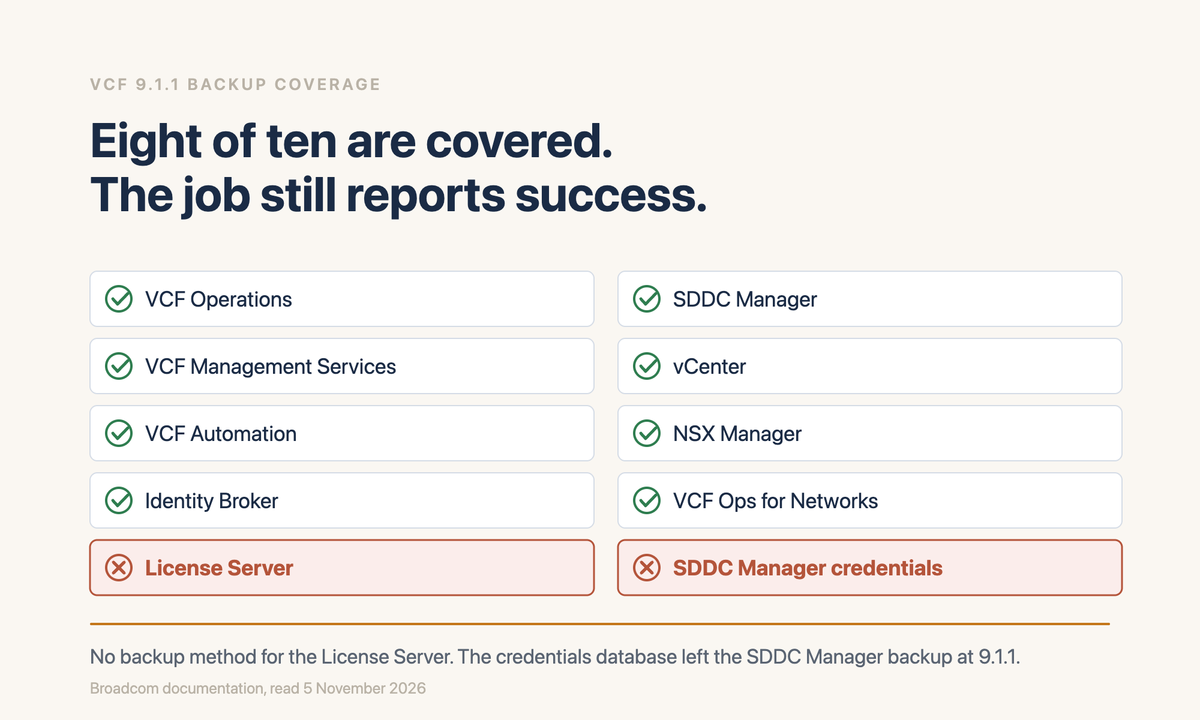
The License Server
There is no backup method. The design blueprint states the recovery procedure plainly: you deploy a new license server and reconfigure licensing. Worth sitting with for a moment, because licence assignment in 9.x runs through VCF Operations and the License Server is a mandatory component. Losing it is recoverable, but it is a rebuild, not a restore, and nobody has it in their recovery runbook because it did not exist before 9.1.
The SDDC Manager credentials database
From VCF 9.1.1 it is no longer included in the SDDC Manager backup. You have to back it up separately through the credentials API and store it securely yourself. Anyone who built their backup process on 9.1.0 and then upgraded has a gap, and the backup job will keep reporting success.
Go and check this one today
If you are on 9.1.1 or later and you have not changed anything about how SDDC Manager is backed up, your credentials database is not in it. The job still succeeds. The failure only shows up when you restore.
What is in the backup, and what quietly is not
Log data
Log management configuration comes across in the VCF Management Services file-based backup. The log data itself does not, and has to be archived separately.
VCF Automation internals
The services runtime and the migration service engine are captured only by a scheduled backup. A manual backup does not include them.
Telemetry and real-time metrics
Same condition. Scheduled backup only.
vSphere Supervisor
Included in the vCenter backup, which is one of the few pleasant surprises here.
NSX Edge configuration
Included in the NSX Manager backup.
Workload domain VMs
Explicitly out of scope of the instance recovery guidance. That is your problem, with your own tooling, and it is the largest part of the estate.
The pattern is that scheduled backups and manual backups are not the same artefact. If your process is to take a manual backup before a change, which is what most change policies mandate, you are not capturing everything a scheduled backup would. Both, then, not either.
Restore is a rebuild
The instance recovery guidance does not describe repairing a VCF instance. It describes rebuilding one completely from backup. The scenarios it names are complete instance failure, malware or ransomware, and datastore corruption.
It is split into linked plans: preparation, the management domain, the fleet components, the workload domains, and vSphere Supervisor. Some tasks can run in parallel. The task library is organised by component and the documentation says plainly that the order it lists them in is not necessarily the order you should do them in, which tells you how much design work sits on your side of the line.
The prerequisite nobody budgets for
An up-to-date record of the system configuration has to exist on secure secondary storage: topology diagrams, network mappings, IP addressing, DNS, NTP and vCenter settings. The documentation calls this mandatory for manual recovery and recommended even when using the automated path. In other words, if your design document is out of date, your recovery is too. That is an argument for keeping the design current that actually lands with a steering committee, which the usual arguments do not.
There is an optional PowerShell module, VMware.CloudFoundation.InstanceRecovery, and its prerequisites are specific enough to be worth knowing before the day you need it: Windows Server 2022 or later, PowerShell 7.5.x or later, the VMware OVF Tool, OpenSSL 1.0.2g or later on the PATH, PowerCLI and Posh-SSH 3.0.8. There is a Confirm-VCFInstanceRecoveryPreReqs command that checks them. Run it now rather than during an incident.
And the backups themselves, in Broadcom’s words, should survive the loss of any given site. If your backup target sits in the same failure domain as the management domain, the recovery guidance does not apply to you.
There is no rollback
This is the one I would put in front of a change advisory board, because the assumption in the room is almost always wrong.
Broadcom documents taking snapshots before an upgrade for exactly one component: the VCF Operations cluster nodes. The procedure is specific. Take the cluster offline from the administrator interface first, so the services stop but the VMs stay up. Snapshot each node from the vSphere Client with both "include virtual machine’s memory" and "quiesce guest file system" cleared. Bring the cluster back online before you start. Delete the snapshots afterwards, because leaving them degrades performance.
What that page does not contain, and what I could not find anywhere else, is any instruction for what to do when an upgrade fails. There is no revert procedure. There is no rollback.
Say this out loud in the change record
The back-out plan for a VCF 9.1 upgrade is restore from backup, not roll back. The only pre-upgrade snapshot Broadcom documents covers one component out of eight. If your change record says "roll back if validation fails", it is describing something that does not exist, and the time estimate attached to it is wrong by a large multiple.
The depot, and why air-gapped customers are fine
The staged path article mentions that configuring the fleet Software Depot is mandatory and that download tokens have been replaced by activation codes from the Business Services console. True, but incomplete in a way that matters if you have no internet, so here is the fuller picture from the connection mode documentation.
There are three modes.
Connected
Direct internet or through a proxy. You register the depot in the Business Services console, take the software depot ID, select the tenant and site, get an activation code and enter it in VCF Operations. This is the mode the activation code belongs to.
Offline Depot
No internet, but a private server you own. The VCF Download Tool pulls binaries onto that server. The software depot does not store them locally, it forwards requests. HTTPS on that server means importing its certificate into SDDC Manager. Optional username and password.
Disconnected
No internet and no depot server. You run the VCF Download Tool on a machine that does have internet, then upload binaries manually. Cleanup is through the tool rather than the Binary Management tab.
So a genuinely air-gapped estate is supported, and it does not need an activation code. If you read the activation code requirement and concluded you were blocked, you were reading the Connected mode path.
Two things will stop a Connected deployment in an enterprise, and both describe the default configuration of most banks I have worked in.
Proxy authentication
Proxy servers using Kerberos or NTLMv2 authentication are not supported. If that is your standard egress proxy, Connected mode is not available to you and the conversation moves to Offline Depot or Disconnected.
TLS interception
SSL and TLS interception can prevent a trusted connection to Broadcom’s authorization server. The fix is importing the proxy’s CA certificate into the depot truststore. Worth raising with the network team before the window rather than during it.
Where a third party fits, and how to shortlist one
Broadcom’s design blueprint says image-based backups require a third-party backup tool, and then stops. It does not name one, and there is no vendor list in the backup documentation. The shortlist is yours to build, which is fine, but it means the obligation to check compatibility is also yours.
One of these is verified. The rest are not.
I checked the Veeam support matrix for this article and the exact minimums are below. Every other product named here is listed because it does the job in general, not because I confirmed it supports vSphere 9.1 or VCF 9.1. Do not read inclusion as evidence of support. Check the vendor’s own compatibility statement and the Broadcom Compatibility Guide against your exact build before anything reaches a shortlist, let alone a purchase order.
Start from what actually has to be covered, rather than from a vendor list. Five things come out of the sections above.
Image-based backup of appliances
VCF Operations and VCF Operations for Networks. The hard requirement is that all VCF Operations cluster nodes are captured at the same time, which is a grouping question rather than a feature-list question.
Somewhere for the file-based set to land
SFTP, and only SFTP, for VCF Management Services, VCF Automation, SDDC Manager and NSX Manager. This is a server you provision, not something a backup vendor gives you.
Immutability
The instance recovery guidance names ransomware as a scenario it exists for. A backup an attacker with administrative rights can delete does not address that scenario.
A home for the credentials database
From 9.1.1 you are exporting it yourself through the credentials API. It is a secret, it is now your responsibility, and a file share is not the answer.
Log retention
Log data is not in any backup. If you have a retention obligation, it is met somewhere else or it is not met.
The one I verified. Veeam publishes minimum versions per vSphere release in KB 2443, last modified 27 October 2026. For vSphere 9.1.1.x the minimum is Veeam Backup and Replication 13.1.2, build 13.1.2.57. For 9.1.0.x it is 13.1, build 13.1.0.411. For 9.0.x it is 12.3.1, build 12.3.1.1139. The same article states that 4K native disks are not supported on any of those rows, which is worth knowing before you plan a repository.
Others that do this class of work. Named so you have somewhere to start, with the caveat above applying to every one of them. For enterprise backup of the appliances: Rubrik, Cohesity, which now also carries the Veritas NetBackup line, Commvault, Dell PowerProtect Data Manager, HYCU, Nakivo and BDRSuite. For replication and site recovery, if you are weighing alternatives to Broadcom’s Protection and Recovery add-on: Zerto, now part of HPE, alongside the replication tiers of most of the above. For immutable storage: object lock on S3-compatible storage, Dell PowerProtect Data Domain Retention Lock, and the hardened repository and immutability tiers each platform offers under its own name.
For the SFTP target itself, resist the urge to buy something. A hardened Linux host running OpenSSH, or SFTPGo if you want a managed interface, is usually the right answer and the easiest to get through a security review. Managed file transfer products exist and some are excellent, but they add an internet-facing attack surface to a management-plane dependency, and that category has a CVE history worth reading before you choose it.
For the credentials export, this belongs in whatever secrets platform you already run rather than a new one. CyberArk, HashiCorp Vault and Delinea all cover it. The requirement is not sophistication, it is that the thing which lets you restore your platform is not stored next to the platform.
For log retention, Splunk, Elastic, Cribl, Graylog, Sumo Logic and Datadog are the usual shortlist, and most estates already run one of them. The work here is confirming that VCF log sources are actually flowing into it, not selecting a product.
Five questions that sort a shortlist faster than a feature matrix
One. Which exact vSphere and VCF build do you support today, in writing, with a link I can give my change board. Two. Can you capture all VCF Operations cluster nodes as a single consistent group, and how. Three. What is your position on quiescing these appliances, given Broadcom says not to quiesce if the cluster cannot be taken offline. Four. Does your immutability hold against an administrator of your own platform, not just against a compromised guest. Five. How long does restoring a management domain take, measured in your lab, not estimated. The fifth one is the one that separates the serious answers from the rest.
None of this is a recommendation of any product. I do not resell any of them and I have not tested most of them against 9.1. What I can say is that the first question above is the one most shortlists skip, and it is the only one that can invalidate everything underneath it.
What I could not resolve
Five things, recorded rather than smoothed over.
OI-01
The Identity Broker backup method is listed as file-based on the component backup page and is absent from the methods table in the design blueprint. I have used file-based.
OI-02
Log management is described as included in the VCF Management Services file-based backup in one place, and log data is described as excluded and requiring separate archiving in another. These reconcile if one means configuration and the other means data, which is how I have written it, but neither page says so.
OI-03
Retention, encryption and backup frequency are not addressed in the design blueprint at all. If you need those for a control, they are your design decisions rather than documented defaults.
OI-04
There is a Broadcom knowledge base article, KB 419155, titled to the effect that an SDDC Manager backup can contain incorrect passwords for NSX Manager, Edge nodes and vCenter in security_password_vault.json. I have not established whether it applies to 9.1.1. If you are relying on that file for recovery, check it before you need it.
OI-05
Of the third-party products named above, only the Veeam support matrix was verified against vSphere 9.1. For the rest I confirmed nothing about 9.1 or VCF 9.1 compatibility, and their inclusion is not evidence of it.
The short version
Provision an SFTP server before you start, because file-based backups have nowhere else to go. Make sure a third-party tool covers VCF Operations, and that it takes all nodes together. Run scheduled backups as well as manual ones, because they capture different things. Back up the credentials database separately if you are on 9.1.1 or later. Accept that the License Server is a rebuild. Keep the design document current, because recovery depends on it. And correct the change record, because there is no rollback.
None of this changes the sequencing in the staged path article. It changes what you have to have in place before Stage 1, and most of it is procurement and approvals rather than engineering, which is the kind of work that takes six weeks if you start it late and an afternoon if you start it early.
VCF Instance Backup and Restore, for the recovery plans, the configuration record prerequisite, the PowerShell module and the credentials database exclusion from 9.1.1
Verify every requirement and exclusion against current documentation before planning a change. These pages move, and the exclusions in particular are the ones worth rechecking.
Views expressed here are my own. I no longer work for Broadcom, and this article is written from public documentation and my own experience.
Tools that go with this
Neither of the planning tools scores backup coverage, which is why this post exists. Estate Readiness Triage tells you which clusters can move. Upgrade Runway tells you whether there is time. Restorability is the thing you have to establish yourself before either number means anything.
Free to use, including with customers. Nothing you enter leaves your browser. All tools.