The Staged Path From vSphere 8 to VCF 9.1
Rushing a full adoption to hit a compliance date produces a worse VCF outcome than staging it. Five stages, three stopping points, a fourth option worth naming, and why going to 9.0 first may cost you a year.

A version of this conversation is happening in a lot of places right now. The customer runs vSphere 8, vCenter 8, vSAN 8 and Aria Operations 8.x. They hold VCF licences. Support dates are approaching. And the full VCF 9.1 adoption they want to do will not fit in the time available.
The destination is not in question. VCF is where the platform is going, the licences are already held, and the capabilities in the full stack are the reason the customer bought it. The question is sequencing, and specifically what happens when a support deadline and a platform programme collide.
Rushing a full adoption to hit a compliance date is the worst of both outcomes. You get a tenancy model designed under pressure, an operating model nobody was trained for, and a self-service platform the application teams route around. I have seen that outcome more than once, and it takes longer to recover from than it would have taken to do properly.
The staged approach below reaches the same destination. It puts the compliance deadline behind you first, then does the adoption work on a timeline that gives it a chance of succeeding. Every stage is a step toward full VCF, not away from it.
Before any of this: is there actually a deadline?
I wrote the paths above assuming the clock is already running. Worth pausing on that, because for a fair number of estates it is not, and the honest first question is whether this needs to happen at all this year.
vSphere 8.0 and VCF 5.x reach end of general support on 11 October 2027, which Broadcom confirmed in writing in October 2026, with technical guidance running beyond that. If you are on 8.0 Update 3 and patching normally, you are supported for roughly another year regardless of what anyone tells you about 9.x. That is not an argument for doing nothing. It is an argument for choosing your own date rather than inheriting one.
Path Zero: stay where you are, deliberately
There is a fourth option the original three paths did not name, and it is legitimate. Stay on vSphere 8, keep patching, and schedule the move for a window that suits the business rather than one that suits a renewal conversation.
The reason to say this out loud is that customers are being told the move is urgent, and for some of them it genuinely is. For others the urgency is somebody else's quarter. Knowing which situation you are in is worth more than any of the sequencing detail that follows.
Which 9.x, and why the obvious answer is wrong
If you do decide to move, the next question is which target, and this is where I have seen people lose a year without realising it.
The instinct is to go to 9.0 because it has been out longer and feels more settled. The problem is that support windows are set per release, not per major version. VCF 9.0 reaches end of general support on 17 September 2027, which is earlier than vSphere 8. VCF 9.1.1 runs to August 2028. Broadcom has since put it in its own words: stopping at VCF 9.0 does not extend the support runway.
Verify the dates for your own SKUs before you build a plan on this. But ask the question explicitly, because "we will go to 9.0 first and 9.1 later" sounds prudent and may be the most expensive sequence available.
The restriction that used to make you choose
Until recently there was a trap in this that nobody enjoyed explaining. Applying the latest security patches to an 8.0 Update 3 estate could land you on a build with no supported forward path, so you were choosing between staying current on CVEs and keeping the upgrade available. For a regulated customer that is not a choice. The security obligation wins, and the upgrade quietly becomes a bigger project than it needed to be.
Broadcom lifted that in October 2026. Estates on vSphere 8.0U3j, 8.0U3k, VCF 9.0.2 EP2 or VCF 5.2.4 can now move forward to 9.1.1 directly, so patching and the upgrade path stop competing.
Worth knowing alongside it: the VCF Upgrade Planner now maps your current state to 9.1.1, flags prerequisites and interoperability, and produces a sequenced roadmap that identifies safe stopping points, exportable into Jira or ServiceNow. That is this article’s argument with tooling attached, and it is a better starting point than a spreadsheet.
The gate before any path
One destination, three stopping points
The distinction that determines your scope is a naming problem more than a technical one.
VCF Operations is mandatory. In 9.x you license the environment through it. Licence files created on the Business Services console upload into VCF Operations and get assigned to vCenter instances from there. There is no way to license a 9.1 estate without it.
VCF Management Services is not mandatory. That is the installer-driven fleet layer: Fleet Lifecycle, SDDC Lifecycle, and the services that log management 9.1.x depends on. Broadcom documents running vSphere Foundation 9.1 without it as a fully supported deployment model, with Management Services deployable later as a Day-N operation.
Two similar names, very different scope implications.
How this maps to Broadcom's own pathways
Broadcom publishes three pathways to VCF 9.1, and they are worth knowing because they answer a different question from the three paths at the top of this article. Mine are about scope, meaning how much of VCF you turn on. Broadcom's are about route, meaning how you get your existing estate there. You need an answer to both.
Cross the two and the planning conversation gets much sharper. A customer taking the Converge route to Path A is a few weeks of work. The same customer taking Deploy New to Path C is a programme with a business case. Both are reasonable. They are not the same conversation and they should not share a slide.
A note on the convergence prerequisites, which people miss
Converging or importing is not version-agnostic. Broadcom's own FAQ is specific about the floor:
- Converging vSphere into a management domain supports vCenter Update 3 or higher
- Converting an environment running NSX 4.2 to a VCF management domain is supported
- Importing clusters as workload domains requires vSphere 8.0 Update 3 and NSX 4.2 or above
If any part of the estate sits below those, you have a prerequisite upgrade before the upgrade, and it belongs in Stage 0 output rather than being discovered in a change window.
The staged roadmap
Five stages. The first three get you compliant and supported. The last two are the VCF adoption itself. They are scheduled work, not optional extras.
Read this one to agree the plan. Read that one to build it.
Stage by stage
Expand any stage for the detail. The checkboxes are for your own pass through the list, nothing is stored.
Stage 0: Discover (days)
No software is installed in this stage. The purpose is to find the things that turn into procurement or field work, because those have lead times measured in weeks and they are the reason projects slip.
Stage 1: Comply (weeks)
The upgrade itself, in an order chosen so that the riskiest parts happen while nothing user-facing is affected. Strict upgrade path validation applies: you can only target a version released after your current version's release date. Since 9.1.1 shipped on 3 September 2026, estates on 5.2.x or 9.0.x upgrade directly to 9.1.1 without stopping at 9.1.0 first, which removes a step and lands you on the newer Bill of Materials.
Stage 2: Stabilise (weeks)
The work that turns a completed upgrade into an operationally sound one. None of it is urgent, all of it gets harder the longer it waits.
Stage 3: Operate (months)
Where the VCF operating model begins. This is the stage that converts held entitlement into delivered capability, and it should have a date in the plan from day one rather than being picked up when convenient.
Stage 4: Adopt (quarters)
The full VCF stack. This is a programme with an operating model change inside it, and it deserves its own business case, governance and timeline. Everything before this stage was infrastructure work. This stage is organisational.
The order, and where the impact lands
Minimum requirements to check against the fleet
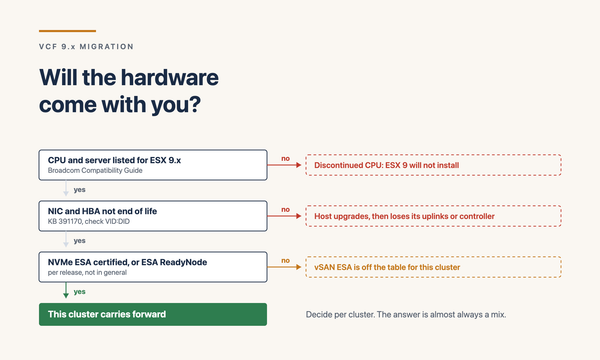
Per ESX host on 9.x:
- 8 GB RAM minimum, 12 GB for production workloads
- 64-bit x86 with hardware virtualisation enabled (Intel VT-x or AMD RVI)
- Boot disk of at least 32 GB, with 128 GB recommended for new deployments
- 32 GB of system disk space minimum
- Boot bank rises from 500 MB to 1 GB. Existing 500 MB boot banks migrate automatically during installation, to either 1 GB or 4 GB.
- One or more Gigabit or faster Ethernet controllers
For ESX-OSData the guidance is a separate persistent device of at least 128 GB, supporting a minimum of 128 TBW and delivering at least 100 MB/s sequential write. SD and USB remain supported for boot bank partitions, but using them for ESX-OSData is deprecated.
The two things that become hardware projects
The doors that only open one way
Staging only helps if the stages are reversible, and some of them are not. These are the points where you should stop and be certain, because there is no going back and the article above does not make that clear enough.
Operating in a partially adopted state
This is the question people forget to ask, and it matters more than the upgrade mechanics. Running between stages carries real operational cost, and knowing what it is prevents a temporary position becoming a permanent one by accident.
During the transition, while clusters are mixed
- Mixed 8.x and 9.1 clusters under one vCenter. Supported during the transition, but your operational runbooks now have two versions of the truth. Anyone troubleshooting needs to know which cluster they are on before they trust a procedure.
- vMotion compatibility across the estate. Check EVC configuration before you start. Moving workloads between upgraded and not-yet-upgraded clusters is exactly what you will want to do during the window, and finding a compatibility block mid-migration is a bad time to discover it.
- VCF Operations at 9.1 monitoring an 8.x estate. Works, and is the intended sequence, but expect gaps in the newer metrics and dashboards until the hosts catch up. Do not treat missing data as a fault during this period.
- Two patch processes running concurrently. Until every cluster is on 9.1 you are maintaining both the old and new lifecycle approach. Keep the window short for this reason alone.
Stopping at Stage 2 for an extended period
- Lifecycle is per-cluster rather than fleet-wide. Without Fleet Lifecycle you are running vLCM cluster by cluster. At ten clusters that is an inconvenience. At fifty it is a headcount conversation, and it scales linearly in a way fleet management does not.
- No unified log management. Log management 9.1.x depends on Management Services. Until then, metrics and logs live in different places and incident investigation costs more time than it should.
- Live Patch eligibility depends on image-managed clusters. If the estate is still baseline-managed, the fast security patching path is unavailable, which matters most during a Critical advisory when you least want to discover it.
- Application and management packs are edition-bound. The database packs require VCF or VCF Edge rather than vSphere Foundation. If database visibility is an operational gap, staying at Stage 2 does not close it.
- Skills decay. A team that upgrades in March and resumes adoption in November has forgotten the context, and the documentation written during Stage 1 has gone stale. The gap between stages has a real relearning cost.
- Paying for unused entitlement. The clearest one. VCF licences held against a vSphere Foundation operating model means funded capability sitting idle.
How to prevent the drift
- Put a date against Stage 3 in the same plan that carries the Stage 1 deadline. Not a vague intention, a scheduled piece of work with an owner.
- Keep the Stage 1 and 2 documentation current rather than archiving it. It is the input to Stage 3.
- Track the gap explicitly. A single slide showing which VCF capabilities are entitled but not deployed keeps the conversation alive at steering committee level.
- Move to image-managed clusters during Stage 2 rather than waiting. It costs little then and unlocks Live Patch immediately.
The argument to take to the customer
This is not a case for doing less. It is a case for doing the same thing in an order that works.
If the customer holds VCF licences, they are already paying for capability the staged approach defers: fleet lifecycle, automation, NSX, VKS, the self-service model. Stopping at Stage 2 and staying there means carrying the cost of the full entitlement while running on native vSphere tooling. That is a real waste, and it is the strongest argument for treating Stages 3 and 4 as scheduled work rather than optional extras.
What the staging buys is the thing full adoption actually needs and rarely gets: time to design the tenancy model properly, time to train the operations team, time to pilot self-service with a real business unit rather than a synthetic tenant. Those are the activities that determine whether the platform gets adopted or worked around, and none of them compress well.
So the conversation is not compliance instead of VCF. It is compliance first, then VCF on a timeline that lets it land. Put a date against Stage 3 in the same plan that carries the Stage 1 deadline, and the sequencing reads as project management rather than avoidance.
What has changed since this was first published
Revision 4, 3 November 2026. Rechecked against Broadcom’s current 9.1 documentation. One claim here was wrong and is corrected above rather than quietly removed. The open item from revision 2 about the 12 October patch set is now partly closed. Several constraints have moved from community reports into Broadcom’s own KBs, and three new ones affect what you do in Stage 0.
Revision 3, 25 October 2026. Broadcom put the lifecycle dates in writing and lifted the restriction that forced a choice between patching and upgrading. The dates and the sections above have been corrected to match. What follows that is the revision 2 record, left as it was.
Revision 2, October 2026.
Updated October 2026. I no longer work for Broadcom, and this article is written from public documentation and my own experience rather than from any internal source. Verify every version, date and requirement against current Broadcom documentation before planning a change. The lifecycle dates in particular are the ones most worth rechecking, and they are the ones this article now depends on most.
Sources
Upgrade paths and deployment
- Upgrading your vSphere Foundation to 9.1
- Deploying vSphere Foundation 9.1 without VCF Management Services
- VCF Upgrade Planning Tool
- William Lam: Demystifying supported upgrade paths to 9.1
Licensing and the License Server
- KB 440630: Upgrade sequence and related issues for VCF and vSphere Foundation 9.1
- vSphere Foundation 9.1 FAQ
- VMware Cloud Foundation 9.1 general FAQ
Requirements and compatibility
- ESX hardware requirements
- What's new in vSphere 9.0 (core licensing, boot bank changes)
- Broadcom Compatibility Guide
- Broadcom Product Interoperability Matrix
- Product Lifecycle Matrix
Added in revision 2
- Pathways to VMware Cloud Foundation 9.1 service brief
- VCF 9.1 release notes index, including 9.1.1 and the 9.1.1.0100 components
- WWT: the VCF 9.1 upgrade, step by step
Added in revision 3
- Customer favourite capabilities: accelerating your path to VCF 9.1.1, 13 October 2026, the source for the confirmed lifecycle dates, the lifted back-in-time restriction and the Upgrade Planner
- VCF 9.1.1 and VVF 9.1.1 feature comparison and upgrade paths
- Managing certificates at scale with VCF 9.1.1, 14 October 2026
- Navigating the AI threat era: upgrading to VCF 9.1 and applying express patches, 1 October 2026
Added in revision 4
- Patch releases 9.1.1.x, the component patch index, and the per-component pages beneath it for vSphere, vSAN, NSX, VCF Operations and VCF Automation
- KB 440630, upgrade sequence and related issues for VCF and vSphere Foundation 9.1, for the addressing requirements, the internal range conflict and the named known issues
- VCF 9.1.1 and VVF 9.1.1 feature comparison and upgrade paths, version 9.1.1 dated 14 October 2026, for the entitlement correction and the fleet lifecycle exclusions
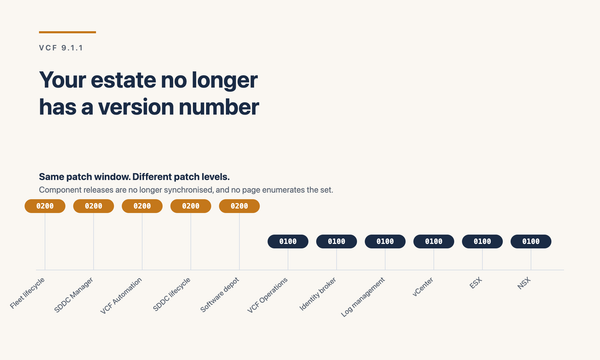
- VCF 9.1 release notes index, for the patch cadence statement that releases are not synchronised across components and do not require a new bill of materials
Release notes
- VCF 9.1.1.0 release notes
- VCF Operations for Integrations 9.1 release notes
- VCF 9.1 and VVF 9.1 feature comparison and upgrade paths
Verify every version, requirement and date against current documentation before planning a change. Release notes move, and the minimum source versions in particular are worth rechecking.
Views expressed here are my own. I no longer work for Broadcom, and this article is written from public documentation and my own experience.