Fleet operations without a fleet
VCF Operations certificate management now reaches standalone vCenter 8.0 Update 3 and above, and VCF 5.2, without converting those estates to VCF. What 9.1.1 added, the CA options, and the licensing line that decides whether you can use it.
Every large vSphere estate I have worked on has the same quiet liability sitting in it. Somebody, years ago, built a spreadsheet of certificate expiry dates. It was accurate on the day it was written. Since then two of the people who maintained it have left, a vCenter has been rebuilt, and nobody is completely sure whether the dates in column C are the certificate or the CA.
It holds until it does not. Then an STS certificate expires on a Saturday, authentication stops working across a platform that was otherwise perfectly healthy, and a Sunday gets spent on something that was knowable three months in advance.
There is a change in VCF 9.1 and 9.1.1 that addresses this, and the interesting part is not the feature. It is the scope. You no longer have to convert an estate to VCF to put its certificates under management.
What actually changed
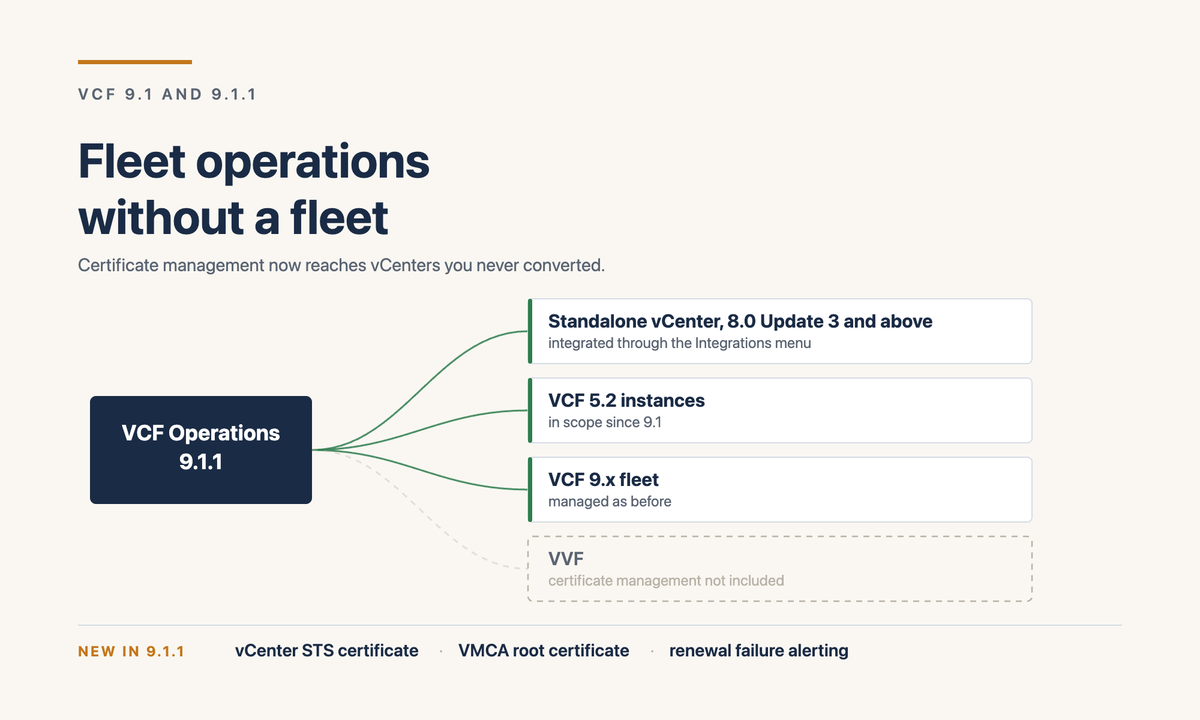
VCF Operations has handled certificate lifecycle inside a VCF fleet for a while. In 9.1 that reach was extended to standalone vSphere 8.0 Update 3 and above, and to VCF 5.2. A standalone vCenter that is not part of any VCF instance is brought in through a workflow under the Integrations menu in VCF Operations.
Read that in terms of an estate rather than a feature list. The fourteen vCenters you have not converted, will not convert this year, and in two cases will never convert because the application sitting on them is going to be decommissioned, can still be managed from one place for the thing most likely to take them down.
Then 9.1.1 filled in the two gaps that mattered most. VCF Operations now manages the vCenter Security Token Service certificate and the VMware Certificate Authority root certificate. STS is the one that causes the Saturday. VMCA root is the one that nobody wants to touch because the blast radius of getting it wrong is the whole platform.
It also lets you view, manage and filter components that are using non-TLS certificates, which is a small feature with a large use in an audit. "Show me everything in the estate not on TLS" is a question most teams currently answer by hand.
What it covers now
The CA question, which is where designs usually stall
In my experience the certificate conversation in a bank does not stall on the platform. It stalls on the certificate authority, because the security team has a CA, a process attached to it, and no appetite for a second path to issuance.
The position in 9.1 is better than it was:
The subordinate CA option is the one I would lead with in a design review. It keeps issuance inside the organisation’s existing trust chain, which is usually the actual requirement hiding behind "we need to use our CA".
The line that decides whether you can use any of this
Here is the part to be clear-eyed about, because it is where the idea either survives contact with procurement or does not.
Certificate and password management is a VCF capability. On Broadcom’s own feature comparison it sits in the VCF column, not the VVF one, along with centralised tag management, lifecycle management, real-time monitoring, predictive capacity management, SecOps and VCF Operations for Networks. VVF customers are pointed at vLCM for lifecycle. Fleet management is listed as a VCF component only.
So "fleet operations without a fleet" is accurate about the vCenters and not about the licence. You still need a VCF Operations instance, and that instance needs to be entitled. What you do not need is to convert every vCenter in the estate into a VCF instance before the capability reaches it. For a large brownfield environment that distinction is the whole argument, because converting fourteen vCenters is a programme and integrating fourteen vCenters is a change.
How I would actually use it
If I were holding a mixed estate right now, this is the sequence I would run.
Start with the vCenters you are least likely to convert, not the ones you are most likely to convert. The ones heading for VCF will pick this up anyway. The ones that are staying standalone for another three years are where the spreadsheet risk actually lives, and they are the ones this was extended to reach.
Get the inventory before the automation. Integrate, let it discover what is there, and look at what comes back. On every estate I have done this kind of exercise on, the discovered list and the maintained list have disagreed, and the disagreement has been the most useful output of the week.
Then turn on renewal alerting before you turn on anything that renews. In that order. An alert that fires on a manual process is useful on day one. Automation whose failure mode is silence is not something to introduce to a regulated platform on a Friday.
And agree the CA path with the security team before you integrate rather than after. If the answer is going to be a subordinate CA under the corporate root, that is a conversation with a lead time measured in weeks, and it is better had while the platform work is still a plan.
What I would check this week
Which of your standalone vCenters are on 8.0 Update 3 or above, because that is the floor for integration and some of them will not be.
Whether your VCF Operations instance is on 9.1.1, because STS and VMCA root arrived in that release and not the one before it.
Whether certificate management is inside the entitlement you hold, in writing, from somebody who can be held to it.
And where that spreadsheet is, and who last touched it.
Sources
- Managing Certificates at Scale with VMware Cloud Foundation 9.1.1, Broadcom, 14 October 2026
- Broadcom TechDocs: Managing certificates in VMware Cloud Foundation
- VCF 9.1.1 and VVF 9.1.1 feature comparison and upgrade paths
- Scale, simplify and secure your private cloud operations with VCF 9.1
- VCF 9.1 release notes index
- Digital Thought Disruption: VCF Operations fleet management
Related: The management plane got smaller, your estate did not on the 9.1.1 footprint change, and the staged path from vSphere 8 to VCF 9.1 on the upgrade sequencing.