VCF 9.1 Upgrade Series Part 4: Brownfield Import vSphere / Aria to VCF 9.1
This is Part 22 of the series, the fourth in the Upgrade Series. Part 19 covered pre-upgrade readiness; Part 20 covered the VCF 5.x to 9.1 major version upgrade; Part 21 covered the 9.0 to 9.1 minor version path. This article covers the third major upgrade scenario: customers without VCF today who want to land on VCF 9.1.
This is a common customer position. Many enterprises run vSphere as their virtualisation platform, NSX-T for networking, and one or more Aria Suite products for management — but never adopted VCF as the integrated platform. The reasons vary: they grew organically, they delayed VCF adoption through cost or complexity concerns, they evaluated alternatives. With VCF 9.1’s capabilities (Private AI Foundation, ACC, vDefend, Fleet Update Service, NVMe Memory Tiering), the calculus changes. Brownfield Import is the path.
Brownfield Import is a structured Broadcom-supported workflow that brings an existing vSphere / NSX-T / Aria environment under VCF 9.1 management. The components stay; the management plane evolves. The workloads are not disrupted. This article walks through the mechanics, the prerequisites, the architectural decisions inside the import, and the post-import operating model.
What Brownfield Import actually does
Brownfield Import is the workflow that takes a non-VCF vSphere environment and brings it under VCF 9.1 management. The key thing to understand: it preserves what works. The hosts, networks, storage, and workloads remain in place. The management plane is what changes.
What gets transformed:
• SDDC Manager is deployed and recognises the existing vCenter, NSX-T, and ESX deployment as the basis for a VCF Instance
• The VCF Management Services Cluster is deployed (the Kubernetes runtime hosting platform services — 12 IPs / 4 FQDNs as in any VCF 9.x deployment)
• Existing vCenter is brought under VCF 9.x lifecycle management
• NSX-T management migrates to VCF 9.x NSX management
• Existing ESX clusters become VCF Workload Domains
• Aria components (if present) transition through ALSM to their VCF 9.x equivalents (VCF Operations, VCF Automation, VCF Operations for Logs / Networks)
• Identity migrates to Identity Broker with the customer’s preferred IDP federation
• Operational surface comes through the new Build / Manage / Operate / Protect console structure
What stays the same:
• Workload VMs continue to run uninterrupted
• vSphere features (DRS, HA, vMotion, Storage vMotion) continue to function
• NSX overlay networks, segments, and policies remain operational
• Storage paths (vSAN, NFS, VMFS, external storage) remain attached
• Backup and DR integrations continue to function
• Custom monitoring integrations continue to receive data (with potential migration to VCF Operations native dashboards)
Prerequisites — the constraints that gate the import
Brownfield Import has specific prerequisites. Many failed imports trace back to missed prerequisites discovered during execution rather than during planning.
Critical prerequisites:
NSX-T 4.1 or later. This is a hard requirement. NSX-T 3.x or earlier 4.0 environments must upgrade NSX-T before Brownfield Import can proceed. This is a project of its own — NSX-T major version upgrades are well-documented but take time and have their own risk profile.
vSphere baseline at vSphere 8.0 Update 3 or later. Earlier versions can be brought as managed workload domains through a path that involves bringing them to the supported baseline first. Verify against the current VCF 9.1 compatibility matrix.
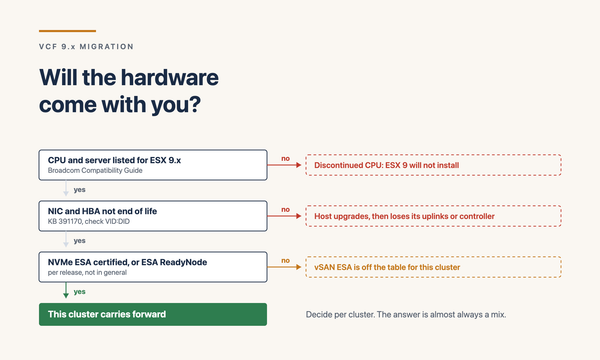
All hosts on the VCF 9.1 HCL. Same constraint as the major version upgrade. Hosts not on the HCL must be retired or upgraded before they can be Workload Domain members.
Standalone ESXi hosts must be clustered. Non-clustered hosts cannot be VCF Workload Domain members. Either cluster them, retire them, or remove them from the import scope.
vCenter Single Sign-On configuration compatible with Identity Broker migration. If the existing environment uses complex SSO topologies (linked-mode across many vCenters, custom identity sources), plan the migration carefully.
Aria Suite components at compatible versions. If Aria Operations, Automation, Logs, or Networks are present, they need to be at versions that can be migrated to VCF 9.x equivalents via ALSM (Aria Suite Lifecycle Manager).
Network prerequisites met. 12 IPs and 4 FQDNs for the Management Services Cluster. Fleet Latency Diagram respected. MTU consistency end-to-end.
vmkernel IP design finalised. Post-import, vmkernel static IPs are effectively locked. Don’t plan to change them after the import — finalise the design before.
Pre-upgrade readiness (Part 19) applies as much to Brownfield Import as to any other upgrade scenario. Inventory, HCL validation, identity strategy, storage decisions, backup verification — all required before execution.
The four common Brownfield Import scenarios
Customers approach Brownfield Import from different starting points. The four common scenarios I see:
Scenario A: vSphere + NSX-T only. Customer runs vSphere 8.x and NSX-T 4.1+ today, with no Aria Suite. Simplest Brownfield Import — the import brings vSphere and NSX-T under VCF 9.1 management, deploys the Management Services Cluster, and VCF Operations starts collecting data. Aria-to-VCF transitions are not needed.
Scenario B: vSphere + NSX-T + Aria Operations only. Customer runs vSphere + NSX-T plus Aria Operations for management observability. The import includes the Aria Operations → VCF Operations 9 transition (per Part 20). ALSM at 8.18 P2+ required for the Aria transition.
Scenario C: vSphere + NSX-T + full Aria Suite. Customer runs the full Aria Suite — Operations, Automation, Logs, Networks. The import handles all four product transitions through ALSM. Logs has the 90-day Log Data Transfer window. Networks supports in-place upgrade. Operations and Automation transition to their VCF equivalents.
Scenario D: vSphere only, no NSX-T. Customer runs vSphere without NSX-T — either flat networks via vDS, or using a third-party network virtualisation. Brownfield Import requires NSX-T as the SDDC networking foundation. This becomes a more complex engagement: deploy NSX-T, migrate networks, then proceed with Brownfield Import.
In my engagements, Scenario B (vSphere + NSX-T + Aria Operations) is the most common. Scenario D is the most architecturally involved — it’s effectively two projects (NSX-T deployment + Brownfield Import) sequenced together.
Architectural decisions inside the import
Brownfield Import isn’t just lifting and shifting. Decisions made during the import shape the post-import architecture. Get these right at the planning stage.
Key architectural decisions:
Workload Domain mapping. How do existing clusters map to VCF Workload Domains? Typical patterns: one Workload Domain per environment (prod, staging, dev), one per business unit, one per geographic location. The mapping affects lifecycle scope, RBAC boundaries, and Day-2 operations.
Management Domain vs Workload Domain placement. VCF 9.x requires a Management Domain. In Brownfield Import, an existing cluster typically becomes the Management Domain. Choose deliberately — the Management Domain hosts the management plane and shouldn’t be the cluster running mission-critical production workloads.
NSX VPC adoption. VCF 9.x introduces the NSX VPC consumption model (covered in Part 15). Existing NSX-T deployments use classic Tier-0/Tier-1 networking. Brownfield Import preserves classic networking; migration to VPC is a post-import architectural decision. Plan whether VPC adoption is in scope.
Identity Broker migration timing. Per-product LDAP/AD integrations become Identity Broker federation. Doing this during Brownfield Import means the migration completes in one window. Doing it later as Day-2 means risk of indefinite deferral. Recommend doing it during.
vSAN OSA / ESA strategy. Existing clusters likely on vSAN OSA. New clusters should be ESA. Brownfield Import preserves OSA; post-import migration to ESA is a separate exercise. Plan the migration timeline.
Aria Networks (if present) future. Aria Networks has in-place upgrade support. Decide whether to keep it standalone or bring it into VCF Operations’ integrated view.
Backup integration. Existing backup software (Veeam, Cohesity, Rubrik, Commvault) needs to be validated against VCF 9.1. Backup proxies may need updates. Schedule the validation in the import plan.
Execution sequence
The high-level Brownfield Import execution sequence:
• Step 1: Pre-import readiness validation (per Part 19, scoped to Brownfield Import constraints)
• Step 2: NSX-T at 4.1+ — if not already, complete this as a separate project
• Step 3: vSphere at 8.0 U3+ baseline — if not already, upgrade vCenter and ESX
• Step 4: Aria Suite components (if present) brought to supported versions via ALSM 8.18 P2+
• Step 5: VCF Installer Brownfield Import workflow initiated
• Step 6: Management Services Cluster deploys into the designated management cluster (12 IPs / 4 FQDNs)
• Step 7: SDDC Manager 9.1 deploys and recognises the existing environment
• Step 8: NSX-T management transitions to VCF 9.x NSX management
• Step 9: Aria components transition to VCF 9.x equivalents (where present)
• Step 10: Identity Broker activates with the customer’s IDP federation
• Step 11: Workload Domain definitions confirmed in SDDC Manager
• Step 12: VCF Operations surfaces the imported environment
• Step 13: Validation across the new platform — inventory accurate, lifecycle operational, identity functional, observability flowing
• Step 14: Post-import operational handover and Day-2 operations transition
Most steps within Brownfield Import are orchestrated by the VCF Installer. The architect’s role is the design decisions feeding the workflow (Workload Domain mapping, identity migration, vSAN OSA/ESA strategy, NSX VPC adoption timeline) plus validation between phases.
Common Brownfield Import failure modes
The failure modes I see repeatedly:
• NSX-T at 3.x — the Brownfield Import workflow refuses to proceed. The customer didn’t realise the 4.1+ requirement until execution. Plan months ahead for NSX-T upgrade if not already done
• vSphere at older versions — same as above. vSphere 8.0 U3+ baseline isn’t optional. Earlier versions require additional upgrade work
• Non-clustered ESX hosts — standalone hosts intended to be brought under VCF management without first being clustered. Cluster them, retire them, or exclude them
• Aria components at incompatible versions — ALSM not at 8.18 P2+, Aria Operations at unsupported pre-transition version. Plan the Aria upgrade sequence carefully
• DNS misconfiguration for the Management Services Cluster FQDNs — the import deploys the cluster, then fails registration. Validate DNS exhaustively before starting
• Management cluster lacks capacity for Management Services Cluster footprint — 92 vCPU / 344 GB vMEM is significant. Pre-validate management cluster headroom
• Custom certificates expiring during import — vCenter, NSX, Aria with expiring certs disrupt the workflow. Renew before starting
• Linked-mode SSO topology complexity — multiple vCenters sharing complex SSO domains can complicate Identity Broker migration. Engage Broadcom support if topology is non-standard
• Third-party plug-ins incompatible with VCF 9.1 management of vCenter/NSX — monitoring agents, backup integrations, storage vendor plug-ins. Validate during Phase 0
• Stakeholder under-engagement — application teams not notified, network team not aware of FQDN registrations, security team not briefed on Identity Broker migration. Pre-import communication is essential
Post-import operating model
Once Brownfield Import completes, the operating model shifts. The team that has been operating vSphere + NSX-T + Aria now operates VCF 9.1. The Build / Manage / Operate / Protect console structure becomes the primary surface. SDDC Manager becomes the fleet management point. VCF Operations becomes the integrated observability.
Day-2 changes to plan for:
• Lifecycle through Fleet Update Service — patches, upgrades, configuration drift management all flow through the new orchestration
• Identity through Identity Broker — per-product LDAP no longer used. RBAC managed through IDP groups
• Observability through VCF Operations — Aria Operations dashboards refactored to the new pillars. Custom dashboards migrated
• Logs through VCF Operations for Logs — the 90-day Log Data Transfer window applies during the transition
• Automation through VCF Automation — templates, blueprints, projects, identity policies migrated
• Security through vDefend (where licensed) — the Security Services Platform becomes the lateral security control plane
• Capability adoption — the new 9.1 features (NVMe Memory Tiering, Auto-RAID, Real-Time Metrics, Live Application Stack Blueprints, etc.) enabled deliberately in a 30–90 day rollout
Plan the Day-2 transition as deliberately as the import itself. The customer team needs training on the new operational surface. Knowledge base articles need updates. Service desk categorisation may need revision. The customer organisation needs time to absorb the new operating model.
Closing
Brownfield Import is the path from “virtualisation customer” to “VCF customer” for the substantial population of enterprises that never adopted VCF in earlier cycles. With VCF 9.1’s capabilities, the value case for adoption has strengthened materially — Private AI Foundation, ACC, vDefend, Fleet Update Service, NVMe Memory Tiering, the integrated operating model. The platform delivers what enterprises increasingly need.
Brownfield Import isn’t a quick exercise. It’s a structured workflow with prerequisites, architectural decisions, and a transition operating model. Done well, it lands the customer on VCF 9.1 without disrupting workloads and with a clear path forward. Done poorly, it produces a half-migrated environment that’s harder to operate than what it replaced.
In my engagements, the Brownfield Import questions I work through every time:
• Which scenario does the customer fit — A (vSphere + NSX-T only), B (+ Aria Operations), C (+ full Aria Suite), or D (vSphere only, no NSX-T)?
• Is NSX-T at 4.1 or later, or is that a separate project first?
• Is vSphere at 8.0 U3 or later?
• Are all ESX hosts on the VCF 9.1 HCL?
• Are any standalone (non-clustered) hosts in scope, and how are they being handled?
• Is ALSM at 8.18 Patch 2 or later for the Aria transition (if applicable)?
• Are 12 IPs / 4 FQDNs allocated for the Management Services Cluster?
• Has the Workload Domain mapping been designed and agreed?
• Is Identity Broker IDP federation configured for activation during import?
• Are third-party plug-ins validated against VCF 9.1?
• Is the Day-2 operating model transition planned alongside the import?
Get those answered and Brownfield Import becomes a deliberate transition rather than a hopeful migration.
Part 23 of the series — the final article in the Upgrade Series — covers post-upgrade operations, validation, rollback procedures, and new-capability enablement across all the upgrade scenarios covered in Parts 20–22.
Sources
• Broadcom — Announcing VCF 9.1
• Broadcom TechDocs — VCF Management Services Models (Brownfield Import context)
• Broadcom — Planning a Successful VCF 9.0 Deployment
• Broadcom — VCF 9.1 is Available: Hands-on Labs
• Broadcom — Scale, Simplify, and Secure VCF 9.1
• William Lam — VCF 9.1 Updated Design Blueprints
• vStellar — VCF 9.1 Home Lab Series