VCF 9.1 Upgrade Series Part 3: VCF 9.0 to VCF 9.1 Minor Version Upgrade

This is Part 21 of the series, the third of five in the Upgrade Series. Part 19 covered pre-upgrade readiness; Part 20 covered the major version path from VCF 5.x to 9.1. This article covers the much simpler scenario: VCF 9.0 to VCF 9.1.
Customers already on VCF 9.0 get a fundamentally different upgrade experience to 9.1. The architecture is consistent. The convergence work is done. The Management Services Cluster exists. Identity Broker is deployed. The new lifecycle capabilities — Fleet Update Service, vCenter Quick Patch, ESX Live Patching — are available to orchestrate the upgrade itself.
This is the upgrade pattern VCF customers have been asking for since the platform launched. Sub-1-minute vCenter downtime. 80% of ESX patches without reboot. 256 clusters upgraded simultaneously. 5,000 hosts per Instance. Maintenance windows compress from days to hours. The lifecycle conversation changes from “when can we afford the downtime” to “what else can we do while the upgrade runs.”
This article walks through the 9.0 to 9.1 path: prerequisites that are much lighter than the 5.x path, Fleet Update Service orchestration, the operational mechanics of parallel cluster upgrades, the new 9.1 capabilities to enable post-upgrade, and the validation checkpoints that close the loop.
Why this upgrade is structurally different from 5.x to 9.1
The 5.x to 9.1 upgrade (Part 20) involved product convergence — Aria Operations becoming VCF Operations, Aria Automation becoming VCF Automation, SDDC Manager fundamentally evolving, the Management Services Cluster being deployed for the first time, Identity Broker replacing per-product LDAP. That was a transition.
The 9.0 to 9.1 upgrade is a minor version patch. The architecture is unchanged. The components evolve, the capabilities expand, but the model is consistent:
• Same VCF 9.x management architecture — Fleet, Instance, Workload Domain hierarchy already in place
• Same Kubernetes-based Management Services Cluster, with new service components added in 9.1 (Real-Time Metrics, expanded vDefend services)
• Same Identity Broker model, with expanded IDP support
• Same VCF Operations console structure, with new 9.1 features surfacing in existing pillars
This means the upgrade can be orchestrated through the platform itself — Fleet Update Service handles the heavy lifting. The architectural decisions are mostly already made. The work is execution, not transformation.
Prerequisites — lighter than 5.x but still important
Pre-upgrade readiness still matters (Part 19 applies), but the scope shrinks significantly compared to the 5.x major version upgrade.
Essential 9.0 to 9.1 prerequisites:
• VCF 9.0 environment at a recent patch level. Out-of-date VCF 9.0 may require interim patching before jumping to 9.1
• Health check across the existing environment — no outstanding alerts, no failed Day-2 operations, no degraded clusters. Healthy starting state is essential
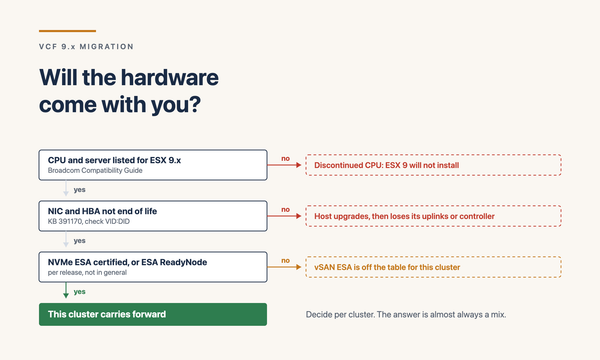
• Hardware HCL validation against VCF 9.1 — most VCF 9.0 hardware should be on the 9.1 HCL, but verify. New 9.1 features (NVMe Memory Tiering, Enhanced DirectPath I/O) may require additional validation if you plan to use them
• Management Services Cluster headroom — 9.1 adds service components (Real-Time Metrics, expanded vDefend, expanded VCF Operations) that consume additional Management Services Cluster capacity. Pre-validate available headroom
• Backup chains verified and tested — same discipline as the major version upgrade. No upgrade without working backups
• Change windows agreed — much shorter than 5.x, but still planned. Fleet Update Service compresses timeline but doesn’t eliminate the need for coordination
• Third-party plug-in compatibility with VCF 9.1 — storage vendor plug-ins, backup integrations, monitoring tools. Most VCF 9.0-compatible plug-ins will work in 9.1, but verify
What you don’t need to plan for (because it’s already in place):
• Aria-to-VCF transition (done in 9.0)
• Identity Broker initial deployment (done in 9.0, though new IDPs can be added)
• 12 IPs / 4 FQDNs for Management Services Cluster (in place from 9.0)
• Brownfield Convert (irrelevant for an existing VCF 9.x environment)
• NSX-T baseline (already at 9.0-compatible version)
Fleet Update Service — the orchestration model
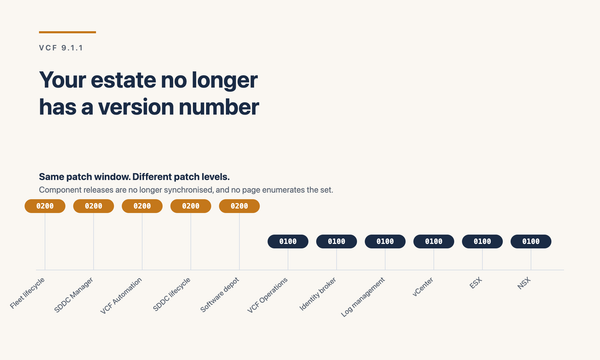
Fleet Update Service is the orchestration engine for VCF 9.1 upgrades. It scales to 256 clusters upgraded simultaneously — a 4x increase over previous releases — and supports up to 5,000 ESX hosts per VCF Instance.
How Fleet Update Service approaches the upgrade:
• Component sequencing managed centrally — the service orchestrates the right order of upgrades across SDDC Manager, vCenter, NSX, ESX, and the Management Services Cluster
• Parallel cluster orchestration — multiple clusters upgraded concurrently within configured concurrency limits
• vSphere Lifecycle Manager (vLCM) cluster images — baselines are dead. Cluster images manage firmware + ESX + components as a unit
• Pre-upgrade health checks — the service validates cluster health before proceeding, blocking unhealthy clusters from upgrade
• Rolling host upgrades within a cluster — standard maintenance-mode-and-migrate pattern, but orchestrated across many clusters in parallel
• Real-time visibility — progress, alerts, and post-step validation surfaced through VCF Operations’ Build pillar
• Configurable orchestration — concurrency limits, sequencing rules, dependency definitions all configurable
For most customers, Fleet Update Service moves the upgrade conversation from “detailed runbook executed by humans” to “policy-driven orchestration with humans validating decision points.” That’s a fundamental shift in how lifecycle work happens at fleet scale.
vCenter Quick Patch — sub-1-minute downtime
vCenter Quick Patch delivers approximately sub-1-minute vCenter downtime for patch operations. Compared to traditional vCenter patching (which historically required maintenance windows of multiple hours due to service restart, plugin re-registration, database operations), this is structurally different.
How vCenter Quick Patch achieves this:
• Differential patching at the binary level rather than full appliance replacement
• In-place service replacement without database migration
• Selective component restart rather than full appliance restart
• Live-patched components remain in memory; only swap-required components restart
What changes operationally:
• Patch windows can land during business hours — a sub-minute disruption is acceptable to most application teams during the workday
• Patch frequency can increase — monthly or even more frequent becomes operationally tractable
• vCenter security patches don’t require waiting for an overnight window — critical security patches can land within hours of release
• Communication overhead drops — a 1-minute disruption requires far less stakeholder coordination than a 4-hour window
Quick Patch is available for VCF 9.1 patches, not for the 9.0-to-9.1 upgrade itself (the first patch landing the 9.1 capability). Once on 9.1, subsequent patches use Quick Patch.
ESX Live Patching — ~80% of patches without reboot
ESX Live Patching delivers approximately 80% of ESX patches without host reboot. The remaining 20% (kernel-level patches, hardware-driver-affecting patches) still require traditional rolling reboot.
Prerequisites for ESX Live Patching:
• TPM-enabled hosts — the patch verification process uses TPM attestation
• ESX 9.x baseline
• vSphere Lifecycle Manager managed cluster
Operational implications:
• Host maintenance mode not required for most patches — workloads continue running on the host during patch application
• vMotion of workloads not required — the patch applies in place
• Patch windows compress dramatically — hundreds of hosts can be patched in a single day without disruption
• Hosts without TPM still upgrade, but lose the Live Patching benefit — they require traditional rolling reboot pattern
Combined with Fleet Update Service’s parallel orchestration, ESX patching at large fleet scale becomes operationally tractable. The previous pattern of patching tens of hosts per maintenance window over weeks of windows compresses to hundreds of hosts in a day during business hours.
Upgrade execution sequence with Fleet Update Service
The high-level Fleet Update Service execution sequence for VCF 9.0 to 9.1:
• Step 1: Pre-upgrade health checks. Fleet Update Service validates the environment health, blocks the upgrade if critical issues are present
• Step 2: Management Services Cluster upgrade. The Kubernetes runtime hosting platform services upgrades first. New 9.1 service components (Real-Time Metrics, expanded vDefend) deploy if licensed
• Step 3: SDDC Manager upgrade to 9.1 version
• Step 4: vCenter Quick Patch on management vCenter, then on Workload Domain vCenters (parallel where Fleet Latency Diagram permits)
• Step 5: NSX Manager upgrade. NSX components upgrade in the proper sequence (Manager, Edge nodes, transport nodes)
• Step 6: ESX patching across Workload Domains via Fleet Update Service. Up to 256 clusters in parallel. Live Patching for TPM-enabled hosts; rolling reboot for non-TPM hosts
• Step 7: vCF Operations component refresh — picks up new dashboards, new pillars, new capabilities
• Step 8: Validation checkpoint — healthy clusters, healthy services, healthy alerts state
Most steps can run in parallel where dependencies permit. A well-orchestrated VCF 9.0 to 9.1 upgrade at a 500-cluster scale customer can complete in a couple of days where the equivalent 5.x to 9.1 transition would take weeks.
New 9.1 capabilities to enable post-upgrade
The upgrade itself is the beginning, not the end. Once on 9.1, the new capabilities should be enabled deliberately rather than left dormant.
Capabilities to plan enablement for:
NVMe Memory Tiering. Identify workload candidates via VCF Operations capacity insights. Enable selectively on cluster-by-cluster basis. Up to 40% TCO reduction on suitable workloads.
vSAN ESA Global Deduplication. Enable on existing ESA clusters where workloads benefit. Up to 8x dedup ratios. Works with Data-at-Rest encryption.
Auto-RAID. Enable policy-driven RAID selection. Validate that policy choices align with workload performance requirements.
Real-Time Metrics. Deploy as a VCF Service to the Management Services Cluster. 2-second granularity metrics. PromQL query support. Plan policy scope and retention.
Security Posture Management (SPM). Requires Advanced Cyber Compliance add-on. Configure baseline benchmarks (VCF + PCI DSS), set drift detection thresholds, integrate with audit reporting.
vDefend enhancements. IDPS Turbo Mode (3x+ throughput), DFW on dVPGs, Self-Service Lateral Security, VKS CNI integration via Antrea. Plan adoption per the DFW 1-2-3-4 maturity workflow.
Enhanced DirectPath I/O. For AI workloads. Hardware-dependent (ConnectX-7 / BlueField-3, AMD vIOMMU). Plan RoCE fabric configuration.
VKS scalability to 500 clusters per Supervisor. Adjusts capacity planning conversations. Plan multi-tenant Kubernetes patterns at the new scale point.
vSAN Protection multi-source replication. New in 9.1. Fan-in, fan-out, heterogeneous storage. Plan adoption alongside DR architecture (Part 18).
Programmatic licence management. 9.1 eliminates the manual 180-day license-usage acknowledgment cycle. Configure programmatic licensing via VCF Operations.
Don’t enable all of these on Day 1. Plan a 30–90 day enablement roadmap that introduces capabilities deliberately, with validation between each.
Validation checkpoints
Validation after each major step in the upgrade. The minimum checkpoints:
• Management Services Cluster health: K8s nodes ready, services running, persistent volumes attached
• SDDC Manager: console accessible, fleet inventory accurate, lifecycle operations functional
• vCenter: post-Quick-Patch verification — inventory intact, host connectivity restored, integrations responsive, plug-ins functional
• NSX: Managers healthy, Edge nodes operational, transport nodes connected, policy enforcement active
• ESX clusters: hosts at 9.1 ESX version, vSAN healthy if applicable, NSX overlay attached, workloads running
• VCF Operations: dashboard render correctly, alerts firing as expected, new pillar features visible
• Identity: federated SSO functional, group mapping intact, MFA enforcement working
• Backup: backup chains operational against the new version, validate a test restore within first 7 days post-upgrade
• Workload health: production workloads stable, no performance regressions, application teams confirming normal operation
Common gotchas in the 9.0-to-9.1 upgrade
Even with the simpler upgrade pattern, things to watch for:
• Out-of-date VCF 9.0 — if the existing 9.0 environment is significantly out of patch, an interim patch level may be required before jumping to 9.1
• Management Services Cluster capacity exhaustion — the new 9.1 services (Real-Time Metrics, expanded vDefend) consume capacity. If the cluster was sized for steady-state 9.0 without headroom, the upgrade can run out of capacity. Plan headroom from the start
• TPM not enabled on hosts intended for Live Patching — cluster-by-cluster validation. Some hosts have TPM hardware but the BIOS feature is disabled. Easy to fix; easier to miss
• Third-party plug-ins partially compatible — some plug-ins work but lose specific features in the new version. Validate before assuming the integration is fully functional
• New service components not authorised by licensing — enabling Real-Time Metrics, vDefend additions, ACC features when the customer hasn’t licensed them. Validate licensing entitlements before enabling
• Custom dashboards in VCF Operations not migrating cleanly — review and refresh custom dashboards post-upgrade. Built-in dashboards refresh automatically
• Drift from configuration baseline — the upgrade is a good time to capture a new configuration drift baseline. Skipping this means future drift detection has a stale reference
Closing
VCF 9.0 to 9.1 is the upgrade pattern customers will live with going forward. Lifecycle as a platform property. Fleet Update Service orchestrating at fleet scale. Quick Patch and Live Patching collapsing maintenance windows. Parallel cluster operations turning weeks of work into days.
For customers already on VCF 9.0, the upgrade to 9.1 is operationally light and architecturally consistent. The work shifts from upgrade execution to capability enablement — deciding which new 9.1 features to adopt, in what sequence, with what validation.
In my engagements, the 9.0 to 9.1 upgrade questions I work through:
• Is the existing VCF 9.0 environment at a recent patch level?
• Has the Management Services Cluster headroom been validated for the new 9.1 service components?
• Are hosts TPM-enabled where Live Patching is wanted?
• Have third-party plug-ins been validated against 9.1?
• Has the 9.1 capability enablement roadmap been agreed (which features adopted in what sequence)?
• Are licensing entitlements confirmed for the new features (ACC, vDefend expansions, Private AI Foundation)?
• Are backup chains tested and rollback procedures documented?
Get those answered and the 9.0 to 9.1 upgrade becomes a near-zero-drama platform operation.
Part 22 of the series covers Brownfield Import — the path for vSphere / Aria customers without VCF today who want to land on VCF 9.1. The greenfield-to-managed transition.
Sources
• Broadcom — Scale, Simplify, and Secure VCF 9.1 (Fleet Update Service section)
• Broadcom — Announcing VCF 9.1
• Broadcom — VCF 9.1 is Available: Hands-on Labs (Fleet Management lab)
• Broadcom — VCF 9.1 Licensing: Programmatic, Centralized, and Built to Scale
• Gibson Virtualization — VCF 9.1 What’s New: VCF Operations
• William Lam — VCF 9.1 Updated Design Blueprints