VCF 9.1 Upgrade Series Part 2: VCF 5.x to VCF 9.1 Major Version Upgrade
This is Part 20 of the series, the second of five articles in the Upgrade Series. Part 19 covered pre-upgrade readiness; this article covers the actual execution path for the most complex upgrade scenario: VCF 5.x to VCF 9.1.
VCF 5.x to VCF 9.1 is a major version upgrade involving the convergence of multiple historically-separate products into the unified VCF 9.x platform. Aria Operations becomes VCF Operations. Aria Automation becomes VCF Automation. The SDDC Manager evolves significantly. The management plane reorganises around the new Kubernetes-based Management Services Cluster. This is not a patch — it is a transition.
The reward is real: VCF 9.1 brings Private AI Foundation, Advanced Cyber Compliance, vDefend with Security Services Platform, NVMe Memory Tiering, vSAN ESA improvements, Fleet Update Service, and the new operating model. Customers on VCF 5.x are missing several years of strategic capability. The upgrade pays back.
This article walks through the convergence sequence, the prerequisites that bite, the architectural decisions inside the upgrade itself, and the validation checkpoints between phases. Sequence matters — do the steps in a different order and the upgrade fails.
The convergence sequence — high-level path
The VCF 5.x to 9.1 upgrade is not one upgrade; it is a sequence of dependent upgrades that must happen in a specific order. The high-level sequence:
• Phase 0: Pre-upgrade readiness complete (Part 19) — inventory, HCL validation, network prerequisites, identity strategy, storage decisions, backup verification, change windows agreed, risk register accepted
• Phase 1: ALSM (Aria Suite Lifecycle Manager) to 8.18 Patch 2 or later — the bootstrap for the Aria-to-VCF transition
• Phase 2: Aria Operations upgrade through to VCF Operations 9 — the management observability plane
• Phase 3: vCenter Server upgrade to version 9 — the platform management
• Phase 4: ESX upgrade to version 9 — the host hypervisor across all clusters
• Phase 5: NSX-T upgrade to 4.1+ if not already — networking prerequisite for the Brownfield Convert path
• Phase 6: VCF Installer Brownfield Convert — transitions the upgraded components into VCF 9.x management
• Phase 7: Post-upgrade validation and new-capability enablement (Part 23 covers this in detail)
Each phase has its own prerequisites, execution steps, validation checkpoints, and rollback considerations. The phases are sequential — you don’t start Phase 3 until Phase 2 is validated complete. Don’t collapse phases. Don’t skip phases. Don’t reorder phases. The dependencies are real.
Phase 1: ALSM (Aria Suite Lifecycle Manager) to 8.18 Patch 2+
Aria Suite Lifecycle Manager (ALSM) is the upgrade orchestrator for the Aria Suite products in VCF 5.x. To upgrade Aria Operations / Automation / Logs / Networks to VCF 9.x equivalents, ALSM itself must first be on 8.18 Patch 2 or later. Earlier ALSM versions cannot orchestrate the Aria-to-VCF transition.
Execution checklist:
• Snapshot ALSM appliance before the upgrade
• Verify ALSM backup is current and tested
• Upgrade ALSM to 8.18 Patch 2 (or latest 8.18 Patch) following the standard ALSM upgrade procedure via vRSLCM UI or appliance management
• Verify ALSM post-upgrade: appliance health, product inventory accurate, environment registrations intact
• Snapshot retained until Phase 2 completes successfully
Common gotchas:
• Insufficient appliance disk space — ALSM upgrade requires headroom. Expand the appliance disk before attempting if running tight
• Certificate expiration during upgrade — if ALSM certificates expire mid-upgrade, the appliance becomes unmanageable. Renew certificates before starting
• Custom ALSM passwords — if root or admin passwords have been changed, document them. Lost ALSM admin password during an upgrade is recoverable but painful
Phase 2: Aria Operations → VCF Operations 9
Aria Operations becomes VCF Operations in VCF 9.x. The upgrade path runs through ALSM and involves significant architectural changes — the new Build / Manage / Operate / Protect console structure (covered in Part 17), Real-Time Metrics deployment, Active Findings, integrated logs, and PromQL support.
Execution sequence:
• Through ALSM, upgrade Aria Operations to the latest 8.x version that supports the transition to VCF Operations 9
• Aria Operations 8.x supersession to VCF Operations 9 via ALSM-orchestrated transition
• Configuration migration: dashboards, custom views, alert definitions, capacity policies, integration points
• Database migration: historical metrics, alert history, configuration drift baselines
• Integration re-configuration: vCenter adapter connections, NSX adapter, storage adapter, custom adapters
• Post-migration validation: dashboards render correctly, alerts fire as expected, capacity metrics flow
Aria Networks (formerly vRealize Network Insight) has a different path — in-place upgrade is supported. Plan that upgrade separately if Aria Networks is in scope.
Aria Logs (formerly vRealize Log Insight) has a more painful path: no in-place upgrade to VCF Operations for Logs. A 90-day Log Data Transfer window is available to migrate historical log data. Plan retention carefully:
• Identify which log streams must be retained for compliance
• Configure parallel ingestion to VCF Operations for Logs during the transition window
• Execute Log Data Transfer to bring historical data into the new platform within the 90-day window
• After 90 days, the old Log Insight environment is decommissioned
Aria Automation becomes VCF Automation through a similar ALSM-orchestrated path. Template, blueprint, project, and identity policy configurations migrate. Validate that self-service catalogues, approval workflows, and integrated automation continue to function post-migration.
Phase 3: vCenter Server to version 9
vCenter is upgraded next. In VCF 5.x environments, there are typically multiple vCenters — the management vCenter for the Management Domain, plus per-Workload-Domain vCenters. Each upgrades independently.
Sequence within Phase 3:
• Management vCenter first — hosts the management workloads, must be upgraded before its dependencies
• Workload Domain vCenters next, one at a time — each affects only its own Workload Domain
• Validation after each vCenter: inventory intact, host connectivity restored, VM operations functional, integrations responsive
vCenter 9 upgrade considerations:
• File-based backup of vCenter taken immediately before the upgrade. Image-based backup also retained
• vCenter prerequisites: DNS forward and reverse records confirmed working, NTP confirmed synchronised, SSO domain healthy
• Identity Broker integration if migrating from per-product vSphere SSO during the upgrade — this can happen now or be deferred until post-upgrade
• vCenter Quick Patch is a VCF 9.1 capability — not available for the 5.x to 9.1 transition itself. Quick Patch becomes available for subsequent patches once on 9.1
• Multi-Workload-Domain environments: do not upgrade all vCenters simultaneously. Sequential reduces blast radius
Common gotchas in this phase:
• Custom certificates expiring — if vCenter custom certificates expire during the upgrade, services fail to restart. Renew first
• Plug-ins incompatible with vCenter 9 — third-party plug-ins (storage vendor plug-ins, backup plug-ins, monitoring integrations) need vCenter 9 compatible versions. Validate during planning, deploy compatible versions before vCenter upgrade
• Linked-mode SSO domain dependencies — if multiple vCenters share an SSO domain, the upgrade sequence within the domain matters. Refer to KB articles for the specific topology
Phase 4: ESX to version 9
ESX hosts upgrade after their corresponding vCenter is upgraded. ESX 9.x is the hypervisor baseline for VCF 9.1; hosts not on ESX 9 cannot be VCF 9.1 Workload Domain members.
Critical pre-conditions for ESX upgrade:
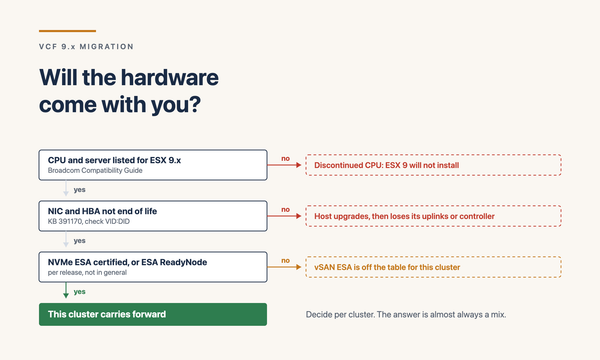
• All ESX hosts on the VCF 9.1 HCL (validated during Phase 0)
• Standalone ESX hosts (not in a cluster) cannot be VCF 9.1 hosts. They must be clustered or removed before the convergence completes
• Sufficient cluster capacity to accommodate workload migration during rolling host upgrades
• DRS and vMotion functional for workload movement during upgrade
Execution per Workload Domain:
• Use vSphere Lifecycle Manager (vLCM) with cluster images for the ESX upgrade orchestration. Cluster images replace the older baseline-based model
• Enter maintenance mode per host, vMotion workloads off, upgrade, exit maintenance mode, validate
• Rolling upgrade per cluster, multiple clusters per Workload Domain can run in parallel within capacity constraints
• Post-host-upgrade validation: ESX version confirmed, host health green, NSX-T attachment intact, storage paths active, workloads running
The critical constraint to plan around: once ESX is upgraded and the Brownfield Convert (Phase 6) begins, vmkernel static IPs are locked. Plan vmkernel network design before, not after. The post-conversion world doesn’t allow changing them easily.
For TPM-enabled hosts, ESX Live Patching becomes available post-conversion — a 9.1 capability that delivers approximately 80% of patches without host reboot. Not available during the 5.x to 9.1 transition itself, but a major operational benefit once on 9.1.
Phase 5: NSX-T to 4.1+ if not already
NSX-T 4.1 or later is the prerequisite for the VCF Installer Brownfield Convert in Phase 6. If the existing environment is on NSX-T 3.x or earlier 4.0, a separate NSX-T upgrade must complete before Phase 6 begins.
NSX-T upgrade considerations:
• Follow the standard NSX-T upgrade path through NSX Manager. NSX-T upgrades have their own well-documented procedures — don’t shortcut them
• Edge node upgrades first, then transport nodes (ESX hosts as transport nodes), then NSX Manager
• Validate end-to-end connectivity after the upgrade — overlay segments routing correctly, edge clusters healthy, DFW rules intact
• For environments using NSX VPC architecture (introduced in VCF 9.x), the VPC model deploys post-conversion. Plan the migration from classic NSX (Tier-0/Tier-1) to VPC after Phase 6 if migrating to VPC
Most environments running VCF 5.x are on NSX-T 3.x. Plan this phase as a project of its own — NSX-T major version upgrades take time and have their own risk register.
Phase 6: VCF Installer Brownfield Convert
This is the convergence point. After Phases 1–5 have brought the individual components to their VCF 9.x baseline versions, the VCF Installer’s Brownfield Convert workflow transitions the upgraded environment into VCF 9.x management.
What Brownfield Convert does:
• Recognises the existing vCenter / NSX-T / ESX deployment as the basis for a VCF Instance
• Deploys the VCF Management Services Cluster (the Kubernetes runtime hosting platform services) into the management infrastructure
• Migrates SDDC Manager from the 5.x version to the 9.x model
• Brings the management plane components under the new VCF 9.x lifecycle, identity, and operations model
• Surfaces the converted environment in VCF Operations and VCF Automation
Pre-conversion checklist:
• All component versions confirmed at VCF 9.x baselines
• Network prerequisites verified: 12 IPs and 4 FQDNs for Management Services Cluster, latency within Fleet Latency Diagram budgets
• Identity strategy ready: Identity Broker IDP configured if migrating during this phase
• Storage ready: vSAN clusters healthy, external storage paths validated
• Backups current for all components
During conversion:
• Brownfield Convert is a multi-hour operation. Plan the change window accordingly
• Workloads remain running throughout — the conversion affects the management plane, not the workload plane
• Status monitoring through the VCF Installer UI. Watch for warnings and act on them promptly
• Network changes happen during conversion — the Management Services Cluster deploys with its 12 IPs and 4 FQDNs. DNS must resolve correctly
Post-conversion validation:
• VCF Operations 9.x console accessible with Build/Manage/Operate/Protect pillars visible
• Workload Domains visible in SDDC Manager 9.x
• Identity Broker functional, user logins working through the federated IDP
• Workload VM operations functional from vCenter 9
• NSX policies intact, traffic flowing
• Backups operational against the new environment
Sequencing tips from real engagements
Things I’ve learned from doing this in customer environments:
• Run Phase 1 (ALSM) and Phase 2 (Aria-to-VCF Operations) end-to-end before touching vCenter or ESX. The Aria-to-VCF transition is the most fragile part of the journey; isolate its risk
• Schedule Phase 3 (vCenter) and Phase 4 (ESX) per Workload Domain rather than across the whole estate at once. Smaller blast radius, fewer concurrent unknowns
• For multi-Instance environments, upgrade one Instance fully (Phases 1–6) before starting the next. Don’t parallel-track across Instances during a major version upgrade
• Identity Broker migration: do it during Phase 6 conversion if possible. Doing it later as a separate exercise often gets deferred indefinitely
• vSAN OSA to ESA migration: typically planned for post-conversion, not during. The upgrade window is busy enough without storage architecture changes overlapping
• New 9.1 capabilities (NVMe Memory Tiering, Auto-RAID, Live Application Stack Blueprints, vDefend, Private AI Foundation): enable post-conversion in a planned sequence, not all at once
• Decommission the old environment only after a 30-day burn-in on the new platform. Premature decommission removes the rollback safety net before the new state is proven stable
Common failure modes
The failure modes that cost weekends:
• Skipping ALSM upgrade and trying to go straight to VCF Operations — ALSM versions older than 8.18 P2 cannot orchestrate the transition. The Aria upgrade silently fails or partially completes
• Custom certificates expiring mid-upgrade — vCenter, NSX Manager, or ALSM with expired certs cannot complete upgrade steps. Renew everything well in advance
• Standalone ESX hosts not clustered — these become incompatible with VCF 9.x post-conversion. Either cluster them before, or remove from the upgrade scope
• vmkernel network drift during upgrade — manual vmkernel reconfigurations during the upgrade can break vSAN, vMotion, or NSX-T VTEP traffic. Don’t modify vmkernel configurations mid-upgrade
• NSX-T not at 4.1+ when starting Phase 6 — the VCF Installer Brownfield Convert fails its prerequisite check. Means rolling back to attempt NSX-T upgrade, which is itself a project
• DNS not resolving for the Management Services Cluster FQDNs — the conversion deploys the cluster, then fails when it can’t register itself. Validate DNS exhaustively before conversion
• Insufficient capacity in management cluster for the new Management Services Cluster footprint — 92 vCPU / 344 GB vMEM is significant. Pre-validate management cluster headroom
• Third-party plug-ins incompatible with vCenter 9 / NSX 9 / VCF 9 — storage vendor plug-ins, backup integrations, monitoring tools may not have shipped 9.x-compatible versions. Validate compatibility during Phase 0
Closing
The VCF 5.x to 9.1 upgrade is the longest, most complex upgrade in this series, and the one where most architects encounter the steepest learning curve. The reward is real — customers on VCF 5.x are missing several years of strategic capability. The risk is also real — sequence matters, prerequisites bite, and the constraints are non-negotiable.
In my engagements, the major version upgrade questions I work through:
• Has Part 19 (pre-upgrade readiness) been fully completed and signed off?
• Is ALSM at 8.18 Patch 2 or later before Phase 2 begins?
• Is the Aria Operations → VCF Operations 9 path validated end-to-end in a non-production environment first?
• Are all vCenters and ESX hosts on the VCF 9.1 HCL?
• Are standalone ESX hosts either clustered or removed from scope?
• Is NSX-T at 4.1 or later before Phase 6?
• Are the 12 IPs and 4 FQDNs for the Management Services Cluster confirmed and DNS-registered?
• Is the Identity Broker IDP configuration ready for activation during conversion?
• Are third-party plug-ins compatible with vCenter 9 / NSX 9 / VCF 9?
• Are backups verified and rollback procedures documented for each phase?
Get those answered and the major version upgrade becomes a sequence of confident, repeatable phases.
Part 21 of the series covers the much simpler VCF 9.0 to 9.1 minor version upgrade — where Fleet Update Service, vCenter Quick Patch, and ESX Live Patching deliver the experience this major version upgrade still can’t.
Sources
• Broadcom — Announcing VCF 9.1
• Broadcom TechDocs — VCF 9.1 Brownfield Import and Convert Workflows
• Broadcom — Planning a Successful VCF 9.0 Deployment
• Broadcom — VCF 9.1 is Available: Hands-on Labs
• William Lam — VCF 9.1 Updated Design Blueprints
• Leaha’s Blog — VCF 9.1.x Ultimate Deployment Guide
• vStellar — VCF-9 Part 1: Introduction & Architecture