VCF 9.1 Upgrade Series Part 1: Pre-Upgrade Readiness & Planning
This is Part 19 of the series, and the opening article of a five-part Upgrade Series covering everything from pre-upgrade planning through post-upgrade validation. The series sits alongside the migration guides in Parts 10–13 — those cover storage-vendor-specific paths for customers running NetApp, Pure, Dell, and HPE. This series covers the platform upgrade itself.
In my engagements, the upgrade conversations that fail tend to fail before the first command runs. Skipped readiness checks, assumed hardware compatibility, untested backup chains, ambiguous change windows, and unaligned stakeholders — these are the failure modes that cost weekends and reputations. The 90% of upgrade success is decided in the planning phase. The 10% is execution.
This article walks through what readiness actually means: assessment, validation, decisions, risk register, change windows, stakeholder alignment. Get these right and the rest of the series — Parts 20–23 covering execution — becomes a sequence of confident, repeatable steps.
Assessment: what to inventory before anything else
The first phase of any VCF 9.1 upgrade is inventory — understanding precisely what you have today before deciding what changes. This sounds obvious; the reason it gets skipped is that the documentation is often wrong, the as-built differs from the design, and customers underestimate how much undocumented state has accumulated.
The inventory checklist:
• Current platform versions: VCF version (5.0, 5.1, 5.2, 9.0?), vCenter version, ESX version per cluster, NSX-T version, SDDC Manager version, Aria Suite component versions (Operations, Automation, Logs, Networks)
• Hardware inventory: ESX host models, firmware levels, NIC types and firmware, storage controllers, GPU cards, TPM-enabled vs not, PCIe topology for any DirectPath workloads
• Cluster inventory: cluster counts per Workload Domain, host counts per cluster, datastore counts and types, current storage architecture (OSA, ESA, external)
• Network inventory: VDS versions, port group configurations, NSX overlay vs dVPG distribution, NSX Edge cluster sizing, vmkernel networks, jumbo frame status
• Storage inventory: vSAN OSA vs ESA per cluster, external storage paths (NetApp / Pure / Dell / HPE), replication configurations, snapshot retention policies
• Identity inventory: per-product LDAP/AD integrations (these are deprecated by Identity Broker), service account dependencies, MFA enforcement points
• Workload inventory: production, staging, dev/test workload distribution, performance-critical applications, applications with maintenance windows, applications that cannot tolerate restart
• Operational inventory: backup configurations and last-tested-restore dates, monitoring tool integrations, ticketing workflows, change approval processes
The VCF Cloud Foundation Assessment Tool (where available) automates a portion of this. The rest is interview-and-document work. Budget time accordingly — in large enterprise engagements I plan 2–4 weeks of inventory work before any upgrade activity begins.
Hardware HCL validation against VCF 9.1
VCF 9.1 introduces several hardware-dependent capabilities that change the HCL conversation: NVMe Memory Tiering, Enhanced DirectPath I/O for AI, Auto-RAID, ESX Live Patching (requires TPM), Cyber Recovery ReadyNodes for the IRE pattern. The HCL is no longer a single yes/no list — it’s a feature-by-feature compatibility matrix.
Critical HCL checks before committing to an upgrade plan:
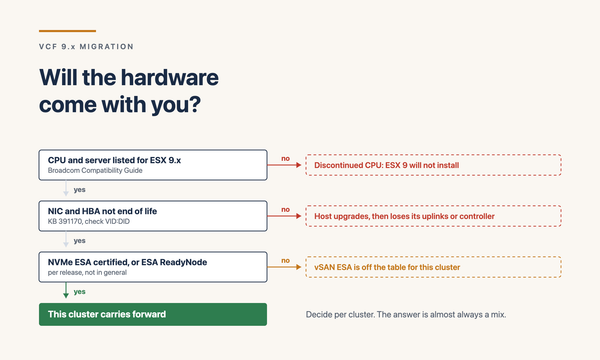
• ESX 9.x baseline support — all hosts must be on the VCF 9.1 HCL for ESX 9. Hosts not on the HCL must be retired or remain on the previous platform
• vSAN ESA hardware requirements — NVMe-only, specific controller requirements, no SAS or SATA. OSA hardware may not qualify for ESA. Plan migrations accordingly
• TPM-enabled hosts — required for ESX Live Patching (~80% no-reboot capability). TPM-less hosts can still upgrade but lose the operational benefit
• NVMe Memory Tiering hardware — specific NVMe device support. Check the 9.1 HCL for validated devices before assuming the capability is available
• Enhanced DirectPath I/O hardware — NVIDIA ConnectX-7 / BlueField-3 NICs validated, AMD vIOMMU support. Older NICs (ConnectX-6 and earlier) not supported for the GPU-to-GPU RDMA path
• GPU support — NVIDIA H100/H200/B100 via AI Enterprise, AMD Instinct MI350 added in 9.1. Older GPUs may not be supported for new Private AI Foundation features
• Storage controller firmware — vSAN ESA has specific firmware requirements that differ from OSA. Update firmware to certified versions before vSAN architecture migration
• Network switch capability — if planning RoCE-capable AI fabrics, the switch fabric must support PFC and ECN. Many existing switches need firmware updates or replacement
The output of this phase is a hardware decision matrix: which hosts stay, which retire, which get NIC/storage upgrades, which gain TPM via firmware updates. Don’t commit the upgrade schedule until this matrix is signed off by the customer.
Network prerequisites — the constraints that shape topology
VCF 9.1 introduces network prerequisites that previous releases didn’t require. The Management Services Cluster (the Kubernetes runtime hosting platform services) needs 12 IPs and 4 FQDNs from Day 0. The Fleet Latency Diagram constrains multi-region designs. These aren’t negotiable; plan them in or the upgrade fails.
The network prerequisite checklist:
• 12 IP addresses for the Management Services Cluster — K8s control plane VIP, K8s control plane node IPs, worker node IPs, service endpoint IPs. Reserve from existing management subnets or allocate new
• 4 FQDNs registered in DNS for the Management Services Cluster endpoints. Forward and reverse records both required
• VCF Operations Collector latency: ≤ 50ms RTT to vCenter / NSX Manager / SDDC Manager; ≤ 300ms RTT between Collectors and central VCF Operations (see Part 14 for the full Fleet Latency Diagram)
• MTU consistency — jumbo frames if vSAN, NSX overlay, or storage benefits from them. Verify end-to-end MTU support across all switches in the path
• Bandwidth for upgrade traffic — ESX image distribution, configuration changes, database migrations all consume bandwidth. Plan for peak vs steady-state
• NSX-T 4.1+ for any Brownfield Import path — older NSX-T versions need separate upgrade first
• Air-gapped environments — HTTP Offline Depot infrastructure must be set up for patch distribution without internet access
• IPv6-only environments — VCF 9.1 supports IPv6-only Guest Customization for managed workloads. If the customer is moving to IPv6-only, factor this into the upgrade plan
Document the network design as a topology diagram. The customer’s network team must agree to the IP allocations and FQDN registrations before the upgrade window. Surprises here cause rollbacks.
Identity strategy — Identity Broker as Day-0 decision
VCF 9.x introduces Identity Broker as the federated identity architecture (covered in detail in Part 17). The upgrade is the right time to migrate from per-product LDAP/AD to Identity Broker — doing it later as Day-2 work is painful and often skipped, leaving technical debt that lingers for years.
Identity decisions to make before the upgrade:
• Which IDP to federate to: Azure AD / Entra ID, Okta, Ping, ADFS, or generic OIDC. Most enterprise customers already have an IDP — use it
• Identity Broker deployment pattern: embedded per-Instance (simplest), centralised across the Fleet (most multi-Instance designs), or per-Fleet with hard isolation (regulatory)
• Group mapping: VCF roles map to IDP groups. Document the mapping in the design. Customer security team needs to align
• Conditional access policies: MFA, device compliance, location restrictions — enforced at IDP, inherited by VCF
• Service accounts: how are service-to-service authentications handled post-migration? Some patterns rely on per-product service accounts that need rethinking
• Break-glass procedure: every deployment needs documented IDP-outage recovery. The first time you discover the IDP is down should not be during a real incident
Migrating identity during the upgrade is much smoother than retrofitting later. The platform team has the maintenance window, the security team has attention focused on the upgrade, and any issues can be addressed before the upgrade is declared complete. Leaving per-product LDAP for Day-2 means the migration competes with operations work and rarely gets prioritised.
Storage path decisions — vSAN OSA, ESA, and external
The upgrade is also an opportunity (or pressure point) to revisit storage architecture. vSAN ESA is the strategic direction. Global Deduplication, Auto-RAID, Data-at-Rest Encryption compatibility, ZSTD compression — the gap between OSA and ESA continues to widen. New clusters should be ESA by default.
Storage decisions for the upgrade plan:
• OSA to ESA migration plan: which clusters migrate, when, via what method. VCF 9.x supports concurrent OSA + ESA mounting in the same cluster during migration windows — Storage vMotion workloads from OSA datastores to ESA datastores
• New cluster default: ESA. Period. New deployments on OSA build technical debt
• Hardware sourcing for ESA: NVMe-only configurations. Plan procurement timeline alongside the upgrade timeline
• External storage paths (NetApp / Pure / Dell / HPE): vendor-specific upgrade considerations in Parts 10–13. Verify the vendor’s VCF 9.1 support matrix during planning
• vSAN Storage Clusters: cross-vCenter sharing patterns. Useful for consolidating storage across multiple Workload Domain vCenters in a single cluster
• Native S3 Object Storage on vSAN (tech preview in 9.1): emerging backup target, AI training data target. Plan capacity and adoption
• Snapshot retention and immutability: if cyber resilience is in scope, vSAN ESA snapshot capabilities are foundational
• Data-at-Rest Encryption: enable from Day-0 on new clusters. Retroactive enablement on existing clusters is supported but more work
Backup verification — don’t upgrade without working backups
The most painful rollbacks I’ve been involved in came from upgrades that proceeded with broken or untested backup chains. The general rule: if you cannot demonstrate a restore from current backups, you do not upgrade. Period.
Backup verification checklist:
• Test restore of SDDC Manager backup within the last 30 days. Recovery requires functioning backup file, target environment, and correct procedure — verify all three
• Test restore of management vCenter — file-based or image-based. Validate that the restore boots, that inventory is intact, that NSX integration recovers
• Test restore of NSX Manager — to a fresh deployment, with verification that policy configuration imports correctly
• Test restore of VCF Operations — historical data, alerts, dashboards
• Workload backup verification — sample restore of production VMs to confirm backup chain integrity
• Application-aware backup verification — SQL Server, Oracle, Exchange test restores where applicable
• Backup retention review — ensure pre-upgrade backups are retained for at least 30 days post-upgrade for rollback fallback
• Documented runbook — who does what restore, in what order, with what success criteria, under what time budget
This phase often surfaces broken backup chains that weren’t known to be broken. Better to find them in the planning phase than during recovery from a failed upgrade.
Change window planning
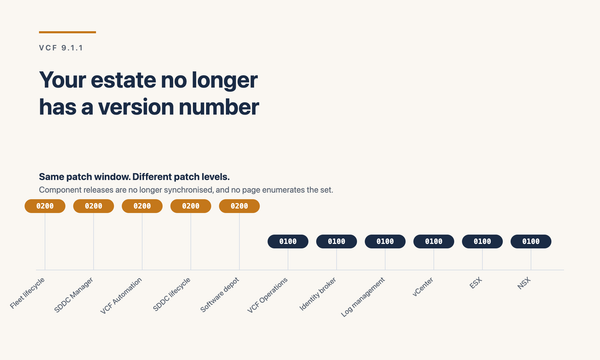
VCF 9.1 introduces capabilities that change how upgrade windows are structured. vCenter Quick Patch delivers sub-1-minute vCenter downtime for patch operations. ESX Live Patching delivers approximately 80% of ESX patches without reboot. Fleet Update Service supports 256 clusters upgraded simultaneously. These change the calculus, but only if you plan to use them.
Change window design considerations:
• Major version upgrade (5.x to 9.1) windows: typically multi-day, multi-window. The convergence path has multiple sequential phases. Plan accordingly
• Minor version upgrade (9.0 to 9.1) windows: can be much shorter with Fleet Update Service. Multi-cluster parallel orchestration compresses the schedule
• Brownfield Import windows: governed by the size of the imported environment. NSX-T preparation, Aria-to-VCF transitions, workload domain creation all consume time
• Maintenance window mix: traditional overnight 4-hour windows are too long for sub-1-min vCenter patches and 80% no-reboot ESX patches. The new pattern is shorter, more frequent, during business hours
• Application maintenance windows: align upgrade activities with application-team maintenance windows where possible
• Rollback windows: every change window must have a rollback decision point. Define the criteria for rollback and the cutoff time
• Communication windows: stakeholder notification before, during, and after. Status update cadence during the window
Risk register — what can go wrong
Every VCF 9.1 upgrade engagement needs a documented risk register. The shape varies but the categories are predictable. The risks I track on every engagement:
• Hardware incompatibility surfacing during upgrade — host fails ESX 9.x upgrade, requiring retire-or-defer decision mid-window
• Network configuration drift surfacing during upgrade — undocumented vmkernel configuration, jumbo frame inconsistency, missing routes
• Storage controller firmware mismatch — ESA migration blocked until firmware updated
• NSX-T version not on the supported path — separate NSX-T upgrade required before VCF upgrade can proceed
• Aria Suite upgrade path not understood — ALSM 8.18 P2+ requirement, Aria Operations to VCF Operations 9 path, etc.
• Identity migration breakage — group mapping incorrect, MFA enforcement breaks service accounts, RBAC roles wrong post-migration
• Application breakage — vSphere replication chains break, application-aware backups fail, custom monitoring integrations break against new APIs
• Performance regression — new platform behaves differently than the old, surface latency or throughput changes that affect applications
• Rollback infeasibility — once certain upgrade steps complete, rollback is no longer technically possible. Document the points of no return
• Stakeholder availability — customer decision-makers unavailable mid-window when a judgement call is needed
• Customer team unfamiliarity with new platform — post-upgrade operations need new skills the team doesn’t have yet
Each risk gets a probability, impact, mitigation, and owner. Risks that can’t be mitigated to acceptable level are escalated before the upgrade is approved. Don’t carry unresolved high-impact risks into execution.
Stakeholder alignment — the soft work that’s actually hard
Technical readiness is necessary but not sufficient. The most-prepared upgrade plan fails if the customer organisation isn’t aligned. Stakeholder work runs in parallel with technical preparation.
Stakeholders to engage explicitly:
• Platform team — obvious; they execute the upgrade and live with the result
• Application owners — their workloads are affected. They need notice, change windows aligned to their tolerance, communication during the window, validation criteria post-upgrade
• Security team — Identity Broker migration, vDefend deployment if planned, SPM benchmark selection if ACC is in scope
• Network team — IP allocations, FQDNs, MTU validation, NSX-T preparation if needed
• Storage team — vSAN ESA migration plan, external storage vendor support validation
• Compliance and audit team — if SPM, ACC, IRE, or vDefend are being adopted, compliance posture changes. Get audit alignment in advance
• Backup team — backup chain validation, retention adjustments, recovery procedure updates
• Service desk — ticket categorisation changes post-upgrade, escalation paths, knowledge base updates
• Executive sponsor — cross-team escalation point, decision authority on rollback or scope changes
In my engagements, weekly upgrade-readiness meetings starting 4–6 weeks before the first window work well. The agenda: status from each track, blockers, risks, decisions needed. Document everything. The customer organisation should be tired of hearing about the upgrade by the time it actually happens — that’s how you know you’ve communicated enough.
Pre-upgrade readiness sign-off
Before the first upgrade command, a readiness sign-off should confirm:
• Inventory complete and validated against running state
• Hardware HCL matrix signed off by customer
• Network design (IPs, FQDNs, MTU, latency) confirmed by network team
• Identity strategy documented and approved by security team
• Storage path decisions documented and resources procured
• Backup verification complete with documented restore test results
• Change windows agreed by all affected application teams
• Risk register accepted with mitigation owners assigned
• Stakeholder communication plan operating
• Rollback procedures documented and accepted
• Executive sponsor confirms go-ahead
If any item is unchecked, the upgrade doesn’t start. This is the single most important discipline in upgrade work — it prevents almost every category of avoidable failure.
Closing
Pre-upgrade readiness is the unglamorous work that makes upgrade execution boring. Boring upgrades are good upgrades. The drama in this field happens when readiness gets skipped, when inventory is approximated, when backup tests are deferred, when stakeholders aren’t aligned.
In my design reviews, the pre-upgrade questions I work through every time:
• What’s the inventory — platform versions, hardware, network, storage, identity, workloads?
• Is the hardware HCL matrix signed off?
• Are the 12 IPs and 4 FQDNs allocated for the Management Services Cluster?
• Is the Fleet Latency Diagram respected by the planned topology?
• Is the Identity Broker strategy decided, with IDP selected and group mapping documented?
• Is the vSAN OSA to ESA migration plan agreed?
• Have backup chains been verified with documented test restore results?
• Are change windows agreed by every affected application team?
• Is the risk register accepted with owners assigned to each mitigation?
• Is the rollback plan documented and tested?
Get those answered and the upgrade execution becomes a sequence of confident, repeatable steps.
Part 20 of the series covers the VCF 5.x to VCF 9.1 major version upgrade journey — the convergence path through Aria Operations, vCenter, ESX, and the VCF Installer Brownfield Convert workflow.
Sources
• Broadcom — Announcing VCF 9.1
• Broadcom — Scale, Simplify, and Secure VCF 9.1
• Broadcom — Planning a Successful VCF 9.0 Deployment
• Broadcom — VCF 9.1 is Available: Hands-on Labs
• Broadcom TechDocs — VCF 9.1 Design Library
• William Lam — VCF 9.1 Updated Design Blueprints
• Leaha’s Blog — VCF 9.1.x Ultimate Deployment Guide