VCF 9.1 Lifecycle Deep Dive: Patching, Upgrades, and Brownfield Import
Lifecycle stopped being a tool you bolt on. In VCF 9.x, it’s the backbone — and 9.1 finishes the architectural shift with the Fleet Update Service, 4× faster parallel cluster upgrades, live patching a
This is Part 3 of an architect’s read of VCF 9.1. Part 1 was the field guide across the twenty design changes. Part 2 was the fleet and instance HLD/LLD walkthrough. This one is the lifecycle deep dive patching, upgrades, brownfield import, and where lifecycle actually lives in the platform now.
There’s a phrase I borrow in design reviews: “lifecycle is no longer optional tooling it’s the backbone.” It’s the cleanest summary of what changed in VCF 9.x.
In VCF 5.x and earlier, lifecycle was two things SDDC Manager for the infrastructure stack, and Aria Suite Lifecycle Manager (ASLCM) for the Aria components. Two separate planes, two separate workflows, two sets of maintenance windows. Sometimes three when you factored in vendor lifecycle for things like Dell VxRail Manager.
VCF 9.x stopped pretending that worked. The 9.0 architecture introduced the Fleet Manager appliance, integrated into VCF Operations, as a single platform plane for lifecycle across the stack. 9.1 finishes that architectural shift the standalone Fleet Manager appliance is retired, lifecycle moves into the VCF Services Platform (the new containerized Management Services Cluster), and parallel cluster upgrades hit 4× the throughput of 9.0.
For architects, this is more than a feature improvement. It changes how you write the HLD chapter for any non-trivial VCF estate and it changes the answer when a customer asks “how long is our next patch window?”
The lifecycle problem VCF used to have
Pre-9.x, the lifecycle picture looked like this:
• SDDC Manager owned ESXi, vCenter, NSX, and vSAN upgrades inside workload domains
• ASLCM owned Aria Operations, Aria Automation, Aria Operations for Logs, Aria Operations for Networks
• vLCM baselines and images existed as a separate vSphere construct, with overlap and ambiguity versus SDDC Manager
• Vendor lifecycle tools (VxRail Manager, partner add-ons) ran in parallel for HCI-specific workflows
Day-2 in this world meant orchestrating across multiple lifecycle tools, multiple maintenance windows, multiple version compatibility matrices. Most architects designed around it: long maintenance windows for cluster upgrades, complex pre-checks, deferred Aria upgrades because the dependencies were brittle.
The cleanup started in 9.0. 9.1 mostly finishes it.
The 9.x lifecycle architecture
VCF 9.x consolidates lifecycle into a single plane:
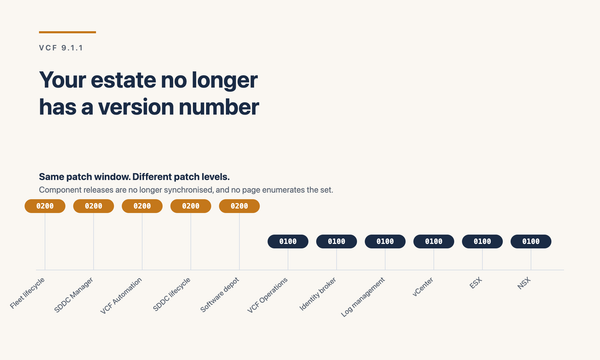
• Fleet Manager, inside VCF Operations, orchestrates lifecycle for the entire VCF platform management components (VCF Operations, VCF Automation, vIDB, Operations for Logs, Operations for Networks), instance components (SDDC Manager, vCenter, NSX), and ESX hosts in workload domains
• vLCM still exists per-domain for ESX image management, but it’s orchestrated by Fleet Manager rather than driven independently
• ASLCM transitions out it becomes secondary, then largely obsolete for day-to-day operations. Some legacy components (e.g., VMware Identity Manager 3.3.x) may still warrant keeping ASLCM around for Day-N until they’re retired
• Aria components are now VCF Operations, VCF Automation, Operations for Logs, and Operations for Networks all under Fleet Manager
The mental shift: lifecycle is platform-native, not appliance-mediated. The architectural shift in 9.1 takes it one step further.
What 9.1 actually changed in lifecycle
Three big architectural changes in 9.1.
The Fleet Manager appliance is retired.
During the 9.0 → 9.1 upgrade, the standalone Fleet Manager appliance has its data component inventory, service registry, user-imported certificates, certificate signing requests, content management endpoints, marketplace configuration, service accounts transferred to new fleet lifecycle and SDDC lifecycle components running inside the Management Services Cluster. The appliance is then decommissioned and shut down.
This is a topology change. Lifecycle in 9.1 lives inside a containerized Kubernetes cluster (the VCF Services Platform / Management Services Cluster), not a dedicated VM. The trend that started with vIDB in 9.0 continues appliance VMs are being replaced by services running on a managed k8s control plane.
Parallel cluster upgrades go 4× faster.
9.0 already supported parallel cluster upgrades, but the parallelism cap was low enough that medium-fleet shops still ran long maintenance windows. 9.1 lifts that cap substantially the community-published claim is up to 4× faster cluster upgrades. In practice, the wall-clock for a fleet upgrade now tends to be dominated by the slowest individual cluster, not by serialization overhead.
If you have a 100-cluster estate, this changes the math. What used to be a multi-weekend window for a fleet-wide upgrade can compress to one weekend or less. Re-baseline your maintenance estimates against this.
Live patching matures to roughly 80% of patch use cases.
9.0 introduced ESX Live Patching with real coverage gaps. 9.1 expands the supported scenarios substantially Broadcom’s claim is up to ~80% of patch use cases now apply without host evacuation. That figure is aspirational actual coverage in your environment depends on which patches and which hardware but even getting half your patches off the maintenance-window calendar is a meaningful operational win.
Combined with vCenter Quick Patch (sub-1-minute vCenter downtime by patching only the changed RPMs), the patch-window narrative changes from “block out a weekend” to “schedule against the CVE timeline.”
There are several smaller but architecturally relevant changes too:
• Expanded upgrade readiness checks VCF Operations now runs more thorough pre-checks to identify upgrade blockers earlier
• HTTP Offline Depot Support for disconnected/air-gapped environments, VCF 9.1 adds HTTP offline depot support for the VCF Installer and Fleet Depot Service. Cleaner LLD for environments without internet access to the Broadcom depot
• Connected-mode licensing automation license files auto-refresh every 24 hours. No more 180-day manual acknowledgment cycle in connected deployments
• Bulk certificate operations push certificate changes across all VCF components simultaneously. Hours-long rotation exercises collapse to minutes
• Encrypted vMotion with hardware offload (Intel QuickAssist) ~70% CPU savings during migrations. Relevant for lifecycle because the most common lifecycle activity is moving VMs off a host to patch it
• Per-instance scale ceiling lifts to 5,000 ESX hosts (2× from 9.0). For very large estates, this changes the instance-boundary math
The new lifecycle topology
The placement of lifecycle services in 9.1:
• VCF Operations fleet-level lifecycle UI and orchestration plane
• Fleet Update Service new lifecycle service inside the Management Services Cluster (the k8s-based VCF Services Platform). Replaces the standalone Fleet Manager appliance
• SDDC Manager retained per-instance for workload domain operations, but narrower in scope than in 5.x
• vLCM per workload domain, for ESX image management, orchestrated by Fleet Manager
• VCF Operations Cloud Proxy a new unified cloud proxy is required in the first VCF Instance after upgrade to 9.1. The legacy vRealize Operations Cloud Proxy 8.18 is no longer supported and must be replaced
This is the new lifecycle stack. The Services Cluster has 12-IP and 4-FQDN networking requirements (covered in Part 2), and lifecycle services are a primary inhabitant of that cluster.
The upgrade order (HLD/LLD detail)
The 9.0 → 9.1 upgrade follows a strict order. Get it wrong and you’ll hit binary download failures or fleet inconsistency.
• 1. Upgrade VCF Operations first (out of band, via the /admin URL). This triggers the deployment of the new fleet lifecycle architecture
• 2. Upgrade SDDC Manager in each instance same flow as legacy VCF, just driven from VCF Operations now
• 3. Deploy the Management Services Cluster with SDDC Manager this is where the new Fleet Update Service and (eventually) vIDB land. If vIDB already exists from 9.0, it will be migrated into the Services Cluster and the old vIDB cluster shut down
• 4. Upgrade other management components VCF Automation, Operations for Logs, Operations for Networks. After the Fleet Management Appliance is patched, other binaries become available for download
• 5. Upgrade core management domain components NSX Manager cluster first, then ESX (NSX Host bits are now bundled with ESX upgrade), then NSX Edge clusters last
A practical note from operators in the field: the Fleet Management Appliance itself must be patched before the lifecycle service will allow you to download or sync other management component binaries. If you see error LCMCOMMON92001 during binary download, that’s the symptom apply the Fleet Management patch first, then retry.
For maintenance release versions (e.g., 9.1.0 → 9.1.x), the same order applies: fleet management/lifecycle service first, then VCF Operations, then other management components, then core. For workload domain upgrades, the per-domain sequence is NSX Manager → ESX (with bundled NSX Host bits) → NSX Edge.
Patching strategy in 9.1
Patching has historically been the lifecycle activity that drives architecture decisions N+x cluster capacity, change windows, evacuation flows, vCenter HA design. 9.1 changes most of those assumptions:
• vCenter Quick Patch sub-1-minute downtime for vCenter patches. Patch windows for vCenter collapse from change-board-class to quick-window
• ESX Live Patching (TPM-enabled hosts) ~80% of patch use cases no longer need host evacuation. Spare cluster capacity reserved purely for patch evacuations can come out of the BoM
• Parallel cluster upgrades (4× faster than 9.0) the wall-clock for fleet-wide patching is dominated by the slowest cluster, not by serialization
• Encrypted vMotion with hardware offload when you do evacuate (the 20% of patches that still need it), Intel QuickAssist offload drops CPU cost by ~70%
The new HLD baseline: don’t size N+x for patching unless you have specific patch types that don’t qualify for Live Patching. Don’t reserve a full maintenance weekend for fleet patching unless you have unusual gating dependencies. Don’t carve out separate vCenter HA scaffolding purely for patch availability Quick Patch makes that scaffolding largely redundant.
The Day-2 SLA conversation gets cleaner: “we can apply CVE-class patches within your change window” is now a defensible position for a much wider range of patches than it was in 9.0.
Brownfield import the underrated 9.1 capability
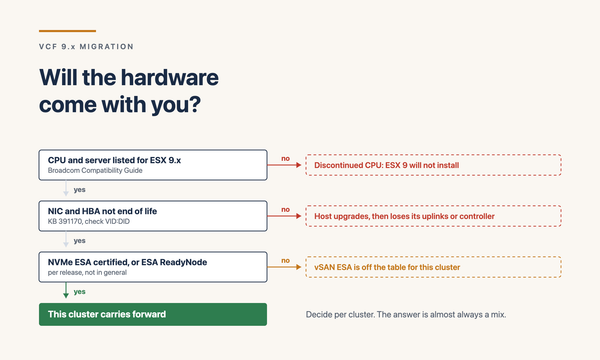
For customers on VCF 5.x or earlier, moving to VCF 9.x is not a single upgrade operation. It’s a multi-stage transition between two fundamentally different lifecycle models.
The brownfield import path is preferred over in-place upgrade. It reduces risk, gives better control, and aligns with the new fleet-based operational model. The high-level flow:
• 1. Bring the existing 5.x environment to a supported, stable patch level (ESXi, vCenter, NSX, vSAN, Aria stack). Skipping this commonly results in blocked upgrade paths later
• 2. Upgrade ASLCM to a minimum supported patch level (ASLCM 8.18 Patch 6 enables installation of the VCF Operations fleet management appliance for 9.0/9.0.1/9.0.2 paths)
• 3. Deploy a new VCF 9.1 instance alongside the 5.x estate
• 4. Import the existing infrastructure as workload domains into the new instance via the brownfield import workflow
• 5. Migrate Aria components from ASLCM management to Fleet Manager
• 6. Decommission ASLCM as a day-to-day tool
A 9.0.2 enhancement removed a significant blocker for brownfield import: management networks with 1 GbE bandwidth are now supported for import scenarios. That widens the set of environments where brownfield import is operationally viable.
The 9.1 capability worth highlighting separately: vSphere 8.0 U3+ as a managed workload domain.
VCF Operations 9.1 can now manage existing vSphere 8.0 U3+ environments as a workload domain. Your VCF instance runs 9.1, but Operations can wrap a separate vSphere 8.0 U3+ environment for lifecycle management. If you’ve been quoting “we can’t move to VCF until we’re done with the vSphere refresh,” this changes the conversation. Bring legacy vCenters under VCF Operations now; migrate the underlying clusters into full VCF workload domains on your own timeline.
This is the architectural lane I’d flag first for customers stuck in a multi-year vSphere refresh program.
What got removed or deprecated (and why it matters for HLDs)
Lifecycle in 9.x also stripped out legacy constructs that have lingered in customer HLDs:
• Enhanced Linked Mode (ELM) no longer supported. HLDs that relied on ELM topology need redesign for VCF Operations / Fleet identity instead
• Integrated Windows Authentication (IWA) replaced by Identity Broker integrations (Azure AD, Okta, Ping, ADFS, OAuth 2.0)
• vSphere Lifecycle Manager baselines vLCM images only in 9.x
• Host Profiles out
• Virtual Volumes (vVols) out
• Storage I/O Control deprecated, with alternative mechanisms
• Update Manager Download Service (UMDS) functionality folded into vLCM
• vCLS (vSphere Cluster Services) deprecated, with retreat-mode recommendation
• VCF Automation Pipelines not in VCF Automation 9
• Intel Optane Persistent Memory (PMem) discontinued. NVMe Memory Tiering is the replacement (see Part 1)
For brownfield HLDs, expect a section in the design document that explicitly addresses each of these what was used, what replaces it, what work the migration requires.
Common HLD/LLD anti-patterns
A few patterns I see repeatedly in lifecycle design reviews.
Treating lifecycle as an afterthought. “We’ll figure out patch windows when we get there.” Not in VCF 9.x. Lifecycle is the backbone. Architect it intentionally Fleet Update Service topology, depot strategy (connected vs offline), pre-check cadence, maintenance window assumptions.
Underestimating brownfield import complexity. Brownfield import is preferred over in-place upgrade for a reason it’s lower risk. But it’s not free. The HLD needs to address 5.x patch level, ASLCM transition, parallel-run period (both 5.x and 9.x live for a while), tenant communication, and identity migration.
Ignoring deprecated features. A customer running ELM, Host Profiles, vVols, or PMem will hit blockers without a plan. The HLD should explicitly catalog deprecated dependencies and document the replacement strategy.
Skipping the Fleet Management appliance patch step. When the binary download fails with LCMCOMMON92001, it’s almost always because the Fleet Management appliance hasn’t been patched first. Sequence matters.
Not planning the Services Cluster network footprint. 12 contiguous IPs and 4 FQDNs per instance for the Management Services Cluster. Plan it into the IPAM design upfront. If you’re using Infoblox (Part 2), include the Cluster in your block reservations.
Designing for the old maintenance window assumption. Old HLDs allocate weekend-long windows for cluster patching. 9.1’s parallel upgrades and live patching can compress that substantially. Update the SLAs and change-board narratives in step.
Decision framework: what kind of lifecycle work am I about to do?
• Patch within a version (e.g., 9.1.0 → 9.1.x): use VCF Operations Lifecycle workflows. Apply Fleet Management appliance patch first, then management components, then core. Use parallel cluster upgrades. Apply Live Patching where supported
• Maintenance release upgrade (e.g., 9.0.2 → 9.1.0): same as above, but with deeper pre-checks, the Services Cluster deployment (if upgrading from 9.0), and a more thorough validation step
• Major version upgrade (e.g., 5.x → 9.x): not an in-place upgrade. Use brownfield import. Plan a parallel-run period. Migrate identity and Aria carefully
• Standing up a new instance alongside legacy vSphere: in 9.1, you can wrap vSphere 8.0 U3+ as a workload domain in your new VCF 9.1 instance. Decouple the VCF adoption from the vSphere refresh timeline
If the lifecycle activity doesn’t fit one of those four categories, dig deeper there’s usually a hidden requirement that needs to be surfaced in the HLD.
Closing
VCF 9.x rebuilt lifecycle from a bolt-on into a backbone. 9.1 finishes the architectural shift the Fleet Update Service inside the VCF Services Platform, 4× faster parallel cluster upgrades, live patching at ~80% coverage, vCenter Quick Patch, brownfield import for VCF 5.x customers, and vSphere 8.0 U3+ as a managed workload domain.
For architects, the implications are concrete: shorter maintenance windows, less reserve capacity for patching, cleaner CVE remediation SLAs, viable migration paths for customers stuck on legacy VCF or pre-VCF vSphere. The HLD chapter on lifecycle stops being three pages of caveats and becomes a real platform design.
For my own design reviews, the lifecycle questions I work through every time:
• What’s the depot model connected, HTTP offline, or air-gapped?
• What’s the patch cadence and live-patch coverage assumption?
• What’s the brownfield import scope, if any?
• Where is the Services Cluster, and what’s the IPAM allocation?
• What deprecated features need a migration path before upgrade?
Get those answered and the lifecycle scaffold for the HLD writes itself.
That closes the Part 3 deep dive. Together with the Architect’s Field Guide (Part 1) and the Fleet and Instance HLD/LLD (Part 2), this is the three-part read of VCF 9.1 I’d hand to a senior architect coming to the platform fresh.
Sources
• VCF 9.1 What’s New (vCollin)
• VCF 9.1: Past the AI Hype, a Solid Maturity Release (Virtual Bytes)
• VCF 9.1 Upgrade Process from VCF 9.0 (Gibson Virtualization)
• VCF 9.1 What’s New: Management Services and Licensing (Gibson Virtualization)
• Upgrading to VCF Operations 9.1 (Broadcom TechDocs)
• Lifecycle Management of VCF Core Components (Broadcom TechDocs)
• Upgrade or Patch the VCF Management Components (Broadcom TechDocs)
• VMware Cloud Foundation 9.0.2 VCF 9.x Upgrade, Lifecycle & Fleet Manager Explained
• VCF 9.0.x Ultimate Upgrade Guide (Leaha’s Blog)
• VCF 9.0 to 9.0.1 Upgrade Part 1 (vElements.net)
• Scale, Simplify, and Secure Your Private Cloud Operations with VCF 9.1 (Broadcom)
• Upgrade VMware Aria Operations to VCF Operations 9.0 (Broadcom TechDocs)