Upgrading to VCF 9.1 from vSphere + Aria Operations: A Customer Migration Guide
The architect’s read on the journey from a standalone vSphere + Aria Operations estate to VCF 9.1. Convergence vs Brownfield Import vs Side-by-side.
This is Part 8 of an architect’s read of VCF 9.1. Parts 1–7 walked through the platform itself the field guide, fleet and instance topology, lifecycle, networking, security, storage, and Private AI. This one is for the customers actually living through the migration: enterprises today running standalone vSphere with Aria Operations, who need to land on VCF 9.1.
This is the largest migration pattern in the post-Broadcom-acquisition VMware ecosystem. The licensing change made VCF the path forward. Aria Operations was rebranded as VCF Operations. SDDC Manager became part of a larger VCF Fleet Management story. The destination is genuinely better unified operations, integrated lifecycle, modern Kubernetes, Private AI support but the journey has constraints, prerequisites, and order-of-operations gotchas that catch teams out.
This piece is the architect’s walkthrough. Source state, target state, three migration paths, the Aria-to-VCF mapping, the convergence procedure that works in practice, the constraints you will hit, and the decision framework for which path matches which customer.
Source state: what most customers actually run today
The typical source state for this migration:
• vSphere 7.x or 8.x (vCenter + ESXi hosts)
• vSAN (HCI) or external storage (NetApp, Pure, Dell, HPE) via NFS / FC / iSCSI
• NSX-T 3.x or 4.x for networking and microsegmentation, or no NSX at all
• VMware Aria Operations (formerly vRealize Operations) for monitoring and capacity
• Possibly VMware Aria Operations for Logs (formerly vRealize Log Insight)
• Possibly VMware Aria Operations for Networks (formerly vRealize Network Insight)
• Possibly VMware Aria Automation (formerly vRealize Automation)
• VMware Aria Suite Lifecycle Manager (formerly vRealize Suite Lifecycle Manager) orchestrating the Aria suite
Different customers run different subsets. Some have all of the above; some have just vSphere + Aria Operations. The migration mechanics differ by source-state complexity, but the architectural shape is similar across customers.
Target state: what VCF 9.1 delivers
The destination platform consolidates and rebrands the source-state components into a unified architecture:
• vSphere 9.x (vCenter + ESX, with ESXi renamed to ESX)
• vSAN ESA as the new design baseline (Part 6 of the series)
• NSX integrated into VCF, with the VPC consumption model (Part 4)
• VCF Operations (was Aria Operations) unified observability with new Build/Manage/Operate/Protect console structure, real-time metrics, PromQL support
• VCF Operations for Logs (was Log Insight) integrated log management
• VCF Operations for Networks (was Aria Network Insight) NetFlow/IPFIX and topology insights
• VCF Automation (was Aria Automation) self-service, IaC, blueprints
• VCF Fleet Management (replaces Aria Suite Lifecycle Manager) fleet-wide lifecycle
• VCF Installer the unified deployment and conversion appliance
• Management Services Cluster (Kubernetes-based) hosts platform services
• Identity Broker federated SSO (Azure AD, Okta, Ping, ADFS, OAuth)
• Optional: vDefend (Part 5), Private AI Foundation (Part 7), Advanced Cyber Compliance (Part 1)
Beyond the rebrand, the platform genuinely consolidates: a fleet-wide operating model, an integrated lifecycle plane (Part 3’s Fleet Update Service), and an architectural baseline for AI and modern application workloads.
The three migration paths
Three architecturally distinct paths exist for getting from source state to VCF 9.1.
Path 1: Convergence (Brownfield Convert). The existing vCenter and its hosts are converted in place into the VCF Instance management domain. Aria Operations becomes VCF Operations. Aria Automation (if present) is imported. The current vSphere environment is uplifted into VCF rather than replaced. This is the dominant path for customers who want minimal workload disruption and have a clean enough source estate to qualify.
Path 2: Brownfield Import. A new (greenfield) VCF 9.x instance is deployed first either in a separate environment or alongside the current one. Existing vSphere environments are then imported as additional workload domains into the new VCF instance. The management plane is new; workload domains retain their existing topology. This is the right path when you need a clean VCF management domain but want to preserve workload-domain investments.
Path 3: Side-by-side migration. A new VCF 9.1 environment is built fresh. Workloads are migrated using HCX or replication tooling. The source environment is decommissioned after workloads are moved. This is the cleanest path architecturally but the highest investment you’re running two environments in parallel during the migration window. The right choice when the source estate has fundamental architectural problems (old hardware end-of-life, broken NSX, fragmented vCenters) that wouldn’t survive an uplift.
The Aria-to-VCF naming and architectural mapping
The rebrand isn’t just renaming. Most components also change architecturally:
• VMware Aria Operations → VCF Operations same product lineage, but extended with VCF-wide observability, real-time metrics (new in 9.1), PromQL, AI-ready APIs
• VMware Aria Operations for Logs (Log Insight) → VCF Operations for Logs architecturally different, no in-place upgrade path; logs migrate via the Log Data Transfer feature
• VMware Aria Operations for Networks (Network Insight) → VCF Operations for Networks in-place upgrade path supported, imports into VCF Fleet Management
• VMware Aria Automation → VCF Automation imports into VCF Operations during convergence, then upgraded to v9 as a separate workstream
• VMware Aria Suite Lifecycle Manager → replaced by VCF Operations Fleet Management ALSM’s role retires
• vRealize Cloud Universal / Aria SaaS → not part of the on-prem VCF story (separate consideration)
Important: VCF Operations Fleet Management replaces Aria Suite Lifecycle. ALSM doesn’t survive the migration; it’s a stepping stone that completes its role by patching to the prerequisite version and orchestrating the Aria Operations upgrade. Then it’s done.
Path 1 in detail: the convergence procedure
The convergence path has a strict order of operations. Skipping or rearranging steps breaks the upgrade. The procedure (consolidating Broadcom’s TechDocs and the field experience from public lab walkthroughs):
Step 1: Patch Aria Suite Lifecycle (if deployed). Aria Suite Lifecycle must be patched to at least version 8.18 Patch 2 (for VCF 9.0.0) or Patch 6 (for VCF 9.0.1+ targets). This is the gate that unlocks the convergence process. The patched ALSM is then used to orchestrate the Aria Operations upgrade in Step 2.
Step 2: Upgrade Aria Operations to VCF Operations 9.x. First patch Aria Operations to the latest 8.18.3 patch level, then use ALSM to upgrade Aria Operations to version 9.x. This is the version that becomes VCF Operations under VCF Fleet Management. Validate dashboards, alerts, custom content, and adapters before continuing.
Step 3 (optional): Upgrade Aria Automation. If Aria Automation is in scope, it can be imported and upgraded to v9.x. Treat this as a separate workstream Automation often has complex custom workflows, integrations, and blueprints that need their own validation cycle. It’s safer to time-box this work independently from the core convergence.
Step 4: Upgrade vCenter. For convergence to VCF 9.0.0 (and 9.1 targets that mandate it): vCenter must be at version 9.x. For convergence to VCF 9.0.1/9.0.2: vCenter at version 8.0 Update 3 or later is acceptable. Confirm the supported vCenter version for your specific target VCF build before starting the version matrix evolves.
Step 5: Upgrade ESX hosts. For convergence to VCF 9.0.0: ESX hosts must be on v9.x. For 9.0.1/9.0.2: ESX hosts at version 8.0 Update 1 or later. Use vSphere Lifecycle Manager (vLCM) cluster images for the host upgrade not baselines, which are deprecated.
Step 6: Deploy the VCF Installer appliance. Download the VCF Installer OVA, deploy it, populate it with the required binaries. The Installer is the deployment and conversion entry point.
Step 7: Run the Brownfield Convert workflow in the VCF Installer. Select “Brownfield” (vs “Greenfield”). Provide the source vCenter credentials. The Installer validates the source environment against the convergence prerequisites standalone ESXi hosts in the inventory will fail; vmkernel adapters without static IPs will fail; SSH must be active where the Installer needs to reach hosts.
Step 8: Convergence executes. The Installer deploys VCF Operations Fleet Management (the fleet-wide service), connects the existing Aria Operations and Aria Automation (if present) to the new appliance, and converts the source vCenter into a VCF Instance management domain. Once complete, you have a VCF Fleet, a VCF Instance, and a Management Domain the same five-layer hierarchy from Part 2 of this series.
Step 9: Validate the converged environment. vCenter still operational under VCF management. VCF Operations dashboards and metrics intact. Custom content preserved. Lifecycle now driven through VCF Fleet Update Service (Part 3 of the series). Cluster images managing host firmware and components.
Step 10: Import additional workload domains. If the customer has multiple vCenters (typical in larger estates), additional vCenter environments can now be imported into the new VCF Instance as additional workload domains via the Brownfield Import workflow. Each must meet its own prerequisites (notably NSX version, vCenter version, ESX version).
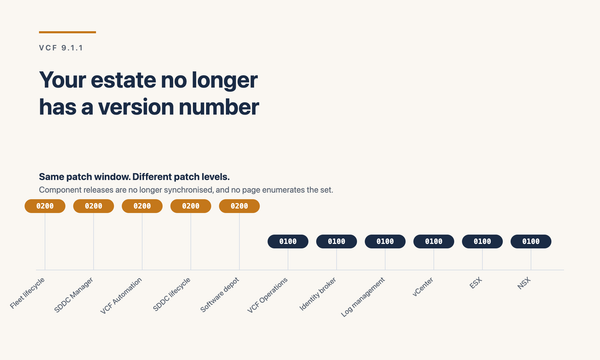
Step 11: Move to VCF 9.1. The convergence procedure today lands you on the 9.0.x family. The move from 9.0.x to 9.1 is then a Fleet Update Service upgrade (Part 3) substantially simpler than the convergence itself.
Constraints and gotchas the things that catch customers out
NSX is not supported in brownfield convergence. This is the single biggest gotcha. The standard convergence procedure does not import an existing NSX deployment. Customers running NSX-T 3.x or 4.x as part of their source estate cannot bring NSX with them through the standard convergence; the convergence assumes the source is vSphere + Aria, not vSphere + NSX + Aria.
There is a separate Brownfield Import path for environments with NSX-T 4.1 or later (with three-NSX-Manager configuration), but this is treated as importing a workload domain into an existing VCF instance not converting the vCenter itself. For customers with NSX in production, plan the migration with this in mind: either rebuild NSX as part of a side-by-side migration, or use the import path with the constraints attached.
Aria Operations for Logs (Log Insight) has no in-place upgrade path. A new VCF Operations Logs instance must be deployed fresh from VCF Fleet Management. All existing log sources need to be redirected to the new instance. Historical logs (up to 90 days) can be migrated using the VCF Operations Log Data Transfer feature in the Administration > Control Panel. Anything older than 90 days will not migrate. Customers with multi-year log retention for compliance need a parallel plan export to long-term storage before convergence.
No standalone ESXi hosts in the vCenter inventory. All ESXi hosts must be part of a vSphere cluster. Standalone hosts typical in older estates or edge sites must be moved into a cluster or removed from inventory before convergence. The Installer will fail the validation if it finds them.
vmkernel adapters must have statically assigned IPs, and IPs must not change afterwards. During convergence, the Installer creates a Network Pool in SDDC Manager based on the assigned vmk IPs. After import, those IPs are locked in. DHCP-assigned vmk IPs, or any plan to change vmk IPs post-convergence, breaks the design. Validate this in the pre-migration assessment.
vCenter must be registered in Aria Operations before convergence starts. The Aria-to-VCF Operations transition relies on the vCenter’s registration in Aria Operations being valid. If that’s broken (e.g., a vCenter that was deleted and re-added, or one where the integration was disconnected), fix the registration first.
SSH must be active on Aria Suite Lifecycle and on ESXi hosts. The convergence process needs SSH access at multiple points. Customers with hardened SSH-disabled-by-default estates need to time-box SSH enablement for the migration window.
Aria Automation’s complex workflows may not survive a fast convergence. Custom blueprints, ABX actions, integrations with external systems (ServiceNow, AD, etc.), and bespoke Code Stream pipelines can require remediation. Treat Aria Automation as a parallel workstream with its own validation and cutover don’t couple it to the core vSphere + Aria Operations convergence.
Source vCenter and NSX Managers must be in the right place. For Brownfield Import (Path 2), the vCenter Server and the NSX Managers being imported must be deployed in the environment being imported, or in the existing VCF Management Domain. They can’t live somewhere unrelated to the new VCF instance.
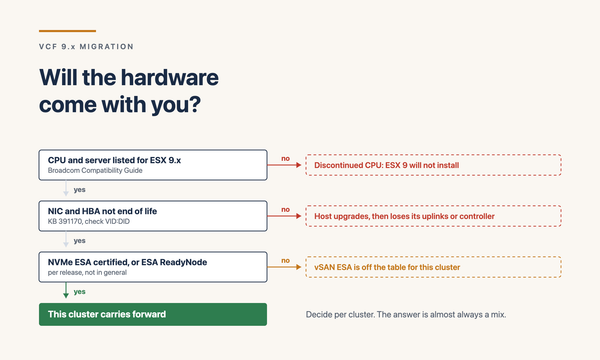
Hardware compatibility for the target. vSAN ESA (Part 6) requires NVMe-only configurations. NVMe Memory Tiering (Part 1) requires supported NVMe devices. Enhanced DirectPath I/O for AI (Part 7) requires ConnectX-7 or BlueField-3 NICs. The migration HLD should validate hardware compatibility for the target VCF 9.1 feature set, not just the source.
Aria Operations → VCF Operations: what migrates, what doesn’t
The Aria Operations transition is the most-asked-about piece for customers whose monitoring estate carries years of customisation. The mapping in practice:
Preserved: dashboards, alerts, custom content. Standard dashboards, custom-built dashboards, alert definitions, super metrics, and views are preserved through the Aria Operations 8.18.x → VCF Operations 9.x upgrade path. Validate after the upgrade some custom content (particularly anything tied to specific adapters or older API patterns) may need minor remediation.
Preserved: vCenter, NSX, vSAN adapters. Core adapter connections to vCenter, NSX, and vSAN are carried forward. Re-validate credentials and collection state after the upgrade. Some adapters require version-specific updates that VCF Operations 9.x ships natively.
Re-evaluate: third-party management packs. Management packs for third-party systems (e.g., NetApp, Pure, Dell EMC, vendor-specific monitoring) may require new versions compatible with VCF Operations 9.x. Inventory these before the migration. The new VCF 9.1 Management Pack Builder can help where vendor packs are not yet available.
Preserved: user accounts and role assignments. Local users, LDAP/AD integration, and role assignments come across. With VCF 9.x, the Identity Broker becomes the recommended pattern for federated SSO evaluate migrating to Identity Broker for a unified identity story across the VCF estate.
Net new in VCF Operations 9.1: Real-time metrics with 2-second granularity (the Real-Time Metrics component deployed as a VCF Service), PromQL support, AI Metrics Observability Dashboard (Grafana-based), Private AI Model and GPU Metrics, the new Build/Manage/Operate/Protect console structure, AI-ready APIs for RAG and MCP frameworks, integrated logs. These are additive on top of the migrated Aria Operations content.
Pre-migration assessment checklist
Before starting any convergence:
• Source-state version inventory: vCenter, ESXi, NSX (if present), vSAN, Aria Operations, Aria Suite Lifecycle, Aria Automation
• Target version selection: VCF 9.0.x as an interim destination, then 9.1 via Fleet Update Service or direct to 9.1 once the convergence procedure officially supports it
• Hardware compatibility: validate ESX hosts against the target VCF 9.1 HCL (especially vSAN ESA NVMe requirements, NIC support, GPU support if AI is in scope)
• Standalone hosts: identified and moved into clusters or removed
• vmkernel adapters: static IPs confirmed, no plans to change post-migration
• Aria Operations registration: vCenter connections valid, custom content inventoried
• Aria Automation: workflows inventoried, integration dependencies mapped, separate workstream scoped
• Aria Operations for Logs: log retention requirements understood, archive plan for content older than 90 days
• NSX state: present or absent, version, manager count, scope of microsegmentation policy
• Third-party management packs: list, target-version compatibility checked
• Backup posture: full backups of vCenter, NSX, Aria Operations before starting
• Rollback plan: documented, tested where feasible, communicated to stakeholders
• Maintenance window: scoped for each step not one big window, multiple smaller windows aligned with the staged procedure
Common HLD/LLD anti-patterns for migration
Treating the convergence as one big upgrade. It isn’t. It’s 8–11 distinct steps, each with its own validation and its own rollback envelope. Plan it as a phased migration project, not a maintenance window.
Trying to bring NSX through the standard convergence. It doesn’t work in the standard path. If you have NSX, either accept the import path (with NSX-T 4.1+ requirement) or plan a side-by-side migration that lets you redesign the NSX layer (Part 4’s VPC consumption model is a real reason to redesign).
Underestimating the Log Insight migration. 90 days of log history is all you keep. For customers with multi-year log retention requirements, plan a parallel archive workflow before the cutover.
Coupling Aria Automation to the core convergence. Automation typically has the most custom content and the longest validation tail. Decouple it. Run it as a parallel workstream with its own go-live.
Skipping the hardware compatibility validation. VCF 9.1’s value depends on features that depend on hardware (vSAN ESA, Memory Tiering, Enhanced DirectPath, vDefend). Validating against the target HCL is non-optional.
Going to VCF 9.0 as a permanent destination. The convergence path today often lands on 9.0.x. Treat 9.0.x as an interim destination and use Fleet Update Service to move to 9.1 don’t leave the estate on 9.0 indefinitely. 9.1 has substantially better lifecycle, observability, security, and storage capabilities.
Skipping the role of Identity Broker. With VCF 9.x, federated SSO via Identity Broker is the recommended identity pattern. Migrating from per-product LDAP/AD to Identity Broker is a separate workstream worth doing during the migration, not after.
Treating the migration as IT-only. Application teams, security teams, compliance teams, and ops teams all have stakes. The communications plan matters. Self-service surface changes (VCF Automation), monitoring console changes (new Build/Manage/Operate/Protect structure), and identity flow changes (Identity Broker) all need user-side messaging.
Decision framework: which path for which customer?
A simplified decision tree based on what I see in real engagements:
• Source is vSphere + Aria Operations only, no NSX, hardware on the HCL, clean state Path 1 (Convergence) is the default
• Source is vSphere + Aria Operations + NSX-T 4.1+, NSX Managers in supported config Path 2 (Brownfield Import) for the NSX-bearing workload domains, optionally combined with Path 1 for the vCenter + Aria management plane
• Source has fundamental architectural problems (multiple disjointed vCenters, broken NSX, old hardware EoL, fragmented Aria) Path 3 (Side-by-side) is cleaner and lower-risk despite higher capital cost
• Source has heavy Aria Automation customisation any path, but treat Aria Automation as a separate workstream with its own cutover
• Source has multi-year Log Insight retention for compliance any path, but build a parallel archive workflow before cutover regardless
• Source is heavily customised with third-party management packs validate pack compatibility against VCF Operations 9.1 before committing to a path
• Target use case is AI / Private AI Path 3 (Side-by-side) is often the right call. AI hardware requirements (ConnectX-7/BlueField-3, GPU-rich hosts) typically don’t exist in the source estate; building fresh and migrating workloads tends to be cleaner
Closing
Upgrading to VCF 9.1 from vSphere + Aria Operations is the largest migration pattern in the post-Broadcom VMware world. The path is real, the destination is genuinely better, but the journey has structural constraints the NSX brownfield limitation, the Log Insight gap, the Aria Suite Lifecycle prerequisite, the strict order of operations that need to be designed for, not discovered.
For my own customer engagements, the questions I work through every time:
• What’s the actual source-state inventory vCenter, ESXi, NSX, Aria Suite components, third-party packs?
• Which migration path Convergence, Brownfield Import, Side-by-side and why?
• Is the hardware on the VCF 9.1 HCL for the features the customer actually wants?
• Is Aria Automation in scope? If so, is it a separate workstream?
• What’s the Log Insight retention strategy 90-day migration or parallel archive?
• Is the customer’s NSX deployment compatible with Brownfield Import, or does it need to be rebuilt?
• What’s the identity story keep per-product LDAP/AD, or move to Identity Broker?
• What’s the cutover plan, the rollback plan, and the communications plan?
• How do we get from the post-convergence 9.0.x landing zone to 9.1 cleanly via Fleet Update Service?
Get those answered and the migration HLD writes itself.
That closes Part 8 the customer migration guide for the VCF 9.1 series. Together with the Architect’s Field Guide (Part 1), the Fleet and Instance HLD/LLD (Part 2), the Lifecycle Deep Dive (Part 3), the Networking Deep Dive (Part 4), the Security Architecture Deep Dive (Part 5), the Storage Architecture Deep Dive (Part 6), and the Production AI Architect’s Playbook (Part 7), this is the eight-part read of VCF 9.1 platform architecture plus the journey to get there.
Sources
• How to Converge a vSphere Environment to VMware Cloud Foundation 9.0 (Broadcom)
• VCF 9.0 Customer Journey Map Convert vSphere + Aria Operations to VCF (Broadcom)
• VCF 9 Converting Brownfield Deployment (Tom Fojta’s Blog)
• VCF 9 Importing Brownfield Environment (Tom Fojta’s Blog)
• Bringing my Homelab to VCF 9.0: Brownfield Converge (mb-labs.de)
• vSphere 8 to VVF 9 Migration vCenter 9 Upgrade, VCF Operations Deployment (VMATT.NET)
• Transform Your Existing vSphere Infrastructure to VMware Cloud Foundation (Hitachi Vantara)
• Supported Scenarios to Converge to VCF (Broadcom TechDocs)