Baselines Are on Borrowed Time The Architect’s Guide to Moving ESXi Patching to vLCM Images
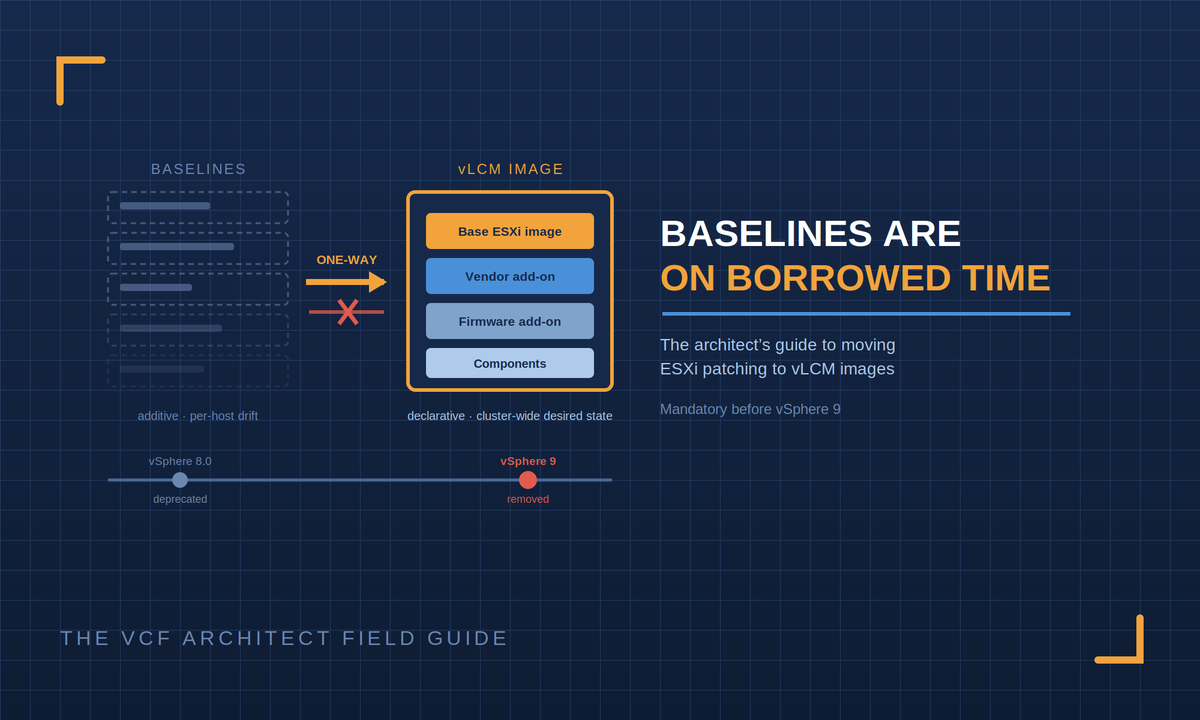
Baseline-based host patching has been deprecated since vSphere 8.0 and cannot carry you into vSphere 9.
This one comes from a reader question a practitioner running baseline-based ESXi patching on 8.0 U2, asking whether image-based patching was viable for their next quarterly cycle and what to read before recommending it to their team. It’s a better question than it looks, because the honest answer isn’t “yes, it’s viable.” It’s “yes, and the clock is running.”
The Forcing Function First
Baseline-based lifecycle management the pattern everyone still calls VUM was formally deprecated with vSphere 8.0. Broadcom’s guidance (KB 322186) is unambiguous: baselines remain usable through vSphere 8.x, and removal comes with the next major release. The vSphere 9 documentation completes the sentence: baselines can only patch 8.x hosts, and clusters still using baselines must be converted to images before they can upgrade to ESX 9.0 or later.
That reframes the team conversation entirely. This is not a tooling preference debate it’s a mandatory transition with a flexible date. The only decision you actually own is whether you make the move deliberately in a quiet quarter, or discover it as a blocking prerequisite in the middle of a vSphere 9 upgrade project. One of those is a pilot and a rollout plan; the other is an unplanned workstream inside your most visible change of the year.
What Changes, Conceptually
Baselines are additive: bulletins and patches attached to hosts, compliance measured against a list. Images are declarative: you define the exact desired state of every host in the cluster, and vLCM converges hosts onto it. An image is composed of up to four parts:
• The base ESXi image the version and build (for our reader, 8.0 U2 or the current target build).
• A vendor add-on the OEM bundle (Dell, HPE, Lenovo, Cisco) carrying the vendor’s drivers and tools for your hardware.
• A firmware add-on (optional) if the vendor’s Hardware Support Manager plugin is deployed, firmware joins the desired state and gets remediated alongside software.
• Additional components individual drivers or agents your estate needs beyond the base and add-on.
The operational wins follow directly from the model: cluster-wide homogeneity (every host converges on the same build no more drift between hosts patched in different windows), drift detection as a standing capability, hardware compatibility checking against the VCG built into the workflow, and image recommendations generated by vLCM itself. The quarterly cycle stops being “apply this list of patches to these hosts” and becomes “update the image definition, review compliance, remediate.”
The Playbook
Seven steps, one quarter, evidence at the end of it.
1. PICK A PILOT CLUSTER
Non-production. Representative hardware if possible.
2. RUN THE ELIGIBILITY CHECK
Cluster > Updates > start the image transition. vCenter
automatically checks eligibility and reports blockers:
standalone VIBs, unintegrated third-party solutions,
hosts below 7.0. Fix what it finds before proceeding.
3. BUILD THE IMAGE
Base ESXi build + vendor add-on (+ firmware add-on if
HSM is deployed) + any additional components. Match
what the hosts actually run today; the transition
workflow helps identify installed components.
4. CHECK COMPLIANCE
vLCM compares every host against the image and shows
the delta before anything changes. Review it this is
where surprises surface safely.
5. REMEDIATE THE PILOT
Hosts converge one at a time the familiar maintenance
mode / evacuation / patch / return rhythm. Same
operational muscle memory, new model underneath.
6. RUN ONE FULL PATCH CYCLE ON IMAGES
When the next patches land: update the image definition,
re-check compliance, remediate. This is the workflow
your quarterly cycle becomes. Time it, document it.
7. TAKE THE EVIDENCE TO THE TEAM, THEN ROLL OUT
Pilot results in hand, transition the estate cluster by
cluster across your normal windows.
The Three Cautions
• It’s one-way. Once a cluster is managed with an image, it cannot revert to baselines (KB 403107). Individual hosts can be moved out to a baseline-managed cluster, but the cluster itself doesn’t switch back. In practice this is a non-issue the destination is where you have to end up anyway but say it out loud in the change record so nobody is surprised.
• One image per cluster. All hosts in a cluster converge on the same build that’s the point. Mixed-hardware clusters need a vendor add-on strategy that covers every model present, and genuinely incompatible hardware mixes are a signal to revisit cluster design, not to stay on baselines.
• Firmware management is optional don’t let it stall you. The Hardware Support Manager integration is a genuine win, but it’s an enhancement, not a prerequisite. Start with software-only images; add HSM when the vendor plumbing is ready.
Two Version Notes Worth Knowing
If you’re on 8.0 U3 or later, the transition workflow can seed the image from what’s already installed on a host in the cluster vLCM retrieves the installed images and calculates the best starting definition, which removes most of the manual image-assembly work. And standalone hosts (not just clusters) have supported image management since 8.0 U1. Neither changes the playbook above; both make it smoother.
One scoping note: everything here is the standalone vSphere path. If your hosts live inside VCF, the transition is orchestrated through VCF’s own lifecycle workflows (supported from VCF 5.2.2+) same destination, different driver’s seat. Don’t hand-convert clusters underneath a VCF instance.
The Architect’s Takeaway
The baselines-to-images transition is the rare change that is simultaneously mandatory, low-risk when done deliberately, and immediately beneficial desired-state patching, drift detection, and HCL validation are wins on day one, not just upgrade insurance. The recommendation writes itself: one pilot cluster this quarter, one patch cycle on images, results to the team, estate rollout across normal windows. By the time vSphere 9 is on your roadmap, the prerequisite is already history.
Sources
• Broadcom KB 322186 Managing ESXi Host Lifecycle Operations with vSphere Lifecycle Manager Images
• Broadcom TechDocs vSphere Lifecycle Manager Baselines and Images (vSphere 9.0 the removal context)
• Broadcom KB 403107 One-Way Transition: No Revert from Images to Baselines